

10 Best Chiropractic SOAP Notes Software: Top Picks Compared 2026

SOAP notes influence patient care, compliance, and revenue, yet many chiropractors still spend late evenings finishing documentation. The challenge is not clinical knowledge but inefficient charting systems that slow you down.
The right SOAP note software should support structured documentation, reduce repetitive entry, and fit naturally into your daily workflow. This article compares the top chiropractic SOAP note platforms based on features, pricing, and real-world usability.
Key Takeaways & Recommendations:
- Noterro offers customizable clinical note templates with built-in AI Scribe at a price suited for small to mid-sized clinics.
- ChiroUp features a patent-pending SOAP Wizard that starts with the assessment and automatically generates objective findings.
- Twofold Health delivers AI notes that adapt to your documentation style over time.
Quick Comparison of Chiropractic SOAP Note Software
| Tool Name | Best For | Capterra Rating | Pricing |
|---|---|---|---|
| Noterro | Customizable Note Templates for Small Clinics | 4.8/5 | Starts at $28.05/month |
| ChiroSpring | SOAP Macros | 4.9/5 | Starts at $149/month |
| ChiroUp | Assessment-Driven SOAP Notes with Built-In Rehab Tools | 5.0/5 | Starts at $149/month |
| Owl Practice | Flexible Note Formats | 4.4/5 | Starts at $12.50/month |
| ChiroNote | Voice-to-SOAP Documentation | NA | Starts at $19/month (Free version available) |
| ChiroTouch | Enterprise-Level Chiropractic Charting | 4/5 | Not publicly listed |
| Twofold Health | AI Notes That Adapt to Your Documentation Style | NA | $69/month or $49/month annually |
| SimplePractice | Multi-Disciplinary Clinics & Built-In SOAP Templates | 4.6/5 | Starts at $24.50/month |
| Myzhealth | Chiro SOAP Templates | 4.6/5 | Starts at $129/month |
| Jane App | Flexible Charting With Form Integration | 4.8/5 | Starts at $54/month per practitioner |
Best Chiropractic SOAP Note Software Solutions to Consider
The order of the tools below does not reflect ranking. Each platform appears here based on user reviews, forum discussions, and publicly available product information.
1. Noterro: Best for Customizable Note Templates for Small Clinics
Noterro is a cloud-based clinic management platform built for small and growing clinics. It offers structured clinical note templates that chiropractors can use out of the box. Clinics can also build fully custom templates that match their own treatment style, exam flow, and documentation preferences.
SOAP notes connect directly to the patient record, billing, and scheduling inside the same system. This keeps documentation organized and consistent without relying on multiple tools.
Features & Pros
- Built-in AI Scribe integrated with full practice management
- Captures clinical audio and drafts structured SOAP notes
- Reduces after-visit charting time for busy clinic schedules
- Fully customizable note templates that clinics can create and modify
- Allows clinicians to review and edit notes before finalizing
- Offers voice, text, predictive charting, and snippet-based documentation
- Works across devices, including desktop, tablet, and mobile
- Connects notes directly to billing, insurance claims, and patient records
- Secure, compliant storage meeting healthcare data standards like HIPAA and PIPEDA
Cons
- No free version available.
Capterra Rating: 4.8/5
Pricing: Starts at $28.05/month with a 14-day free trial.
2. ChiroSpring: Best for SOAP Macros

ChiroSpring is a chiropractic-specific EHR that blends structured SOAP documentation with billing and compliance workflows. It supports exam-based charting, re-exams, and daily visit notes within a cloud system built only for chiropractors.
Its AI Scribe listens during visits and converts conversations into organized clinical notes. Clinics that want AI assistance without leaving their chiropractic EHR environment often consider ChiroSpring.
Features & Pros
- AI Scribe that listens during patient encounters and drafts structured chiropractic notes
- Exam-driven documentation templates tailored to chiropractic workflows
- One-click macros and shortcuts to speed up repetitive charting
- Built-in ICD and CPT coding support connected directly to notes
- Compliance-focused documentation tools designed for audits and reporting
- Customizable visit types including exams, re-exams, and daily visits
- Real-time integration between charting, billing, and claims submission
- Cloud-based system with remote access and secure data storage
Cons
- Higher starting price compared to entry-level platforms
- Learning curve during initial setup due to system depth
- AI Scribe requires clinician review and editing before finalizing
Capterra Rating: 4.9/5
Pricing: Starts at $149/month.
3. ChiroUp: Best for Assessment-Driven SOAP Notes with Built-In Rehab Tools
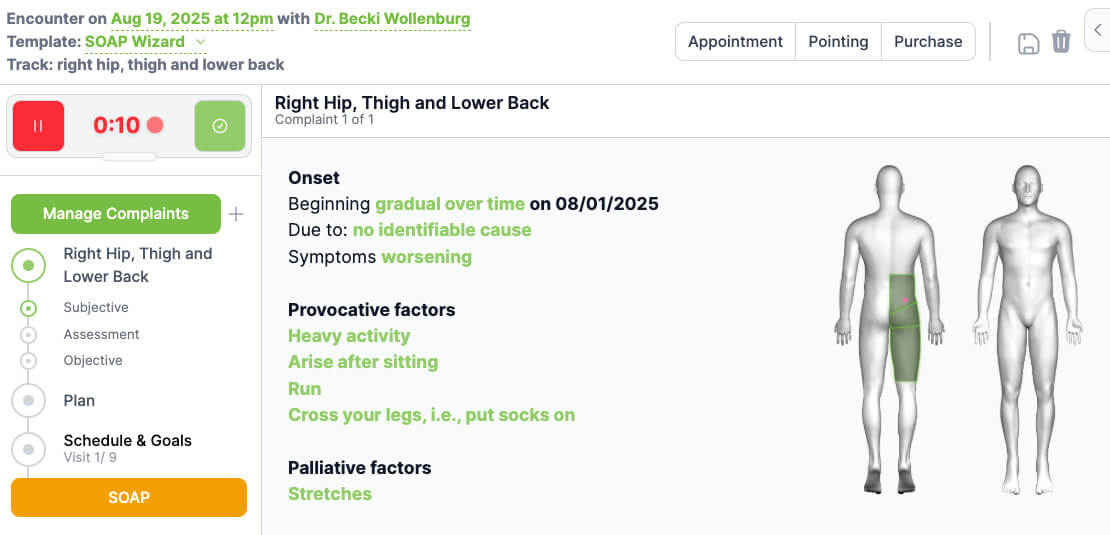
ChiroUp takes a different approach to SOAP notes. Its patent-pending SOAP Wizard starts with the assessment first, then auto-generates matching objective findings.
The platform intentionally flips the traditional documentation order to improve speed and accuracy. By aligning documentation with diagnosis and treatment planning, ChiroUp connects charting directly to rehab protocols and patient education resources within the same system.
Features & Pros
- Patent-pending SOAP Wizard that starts with assessment and auto-generates objective findings
- Integrated SOAP documentation aligned with chiropractic rehab workflows
- Voice-to-chart functionality for faster note creation
- Click-to-select exam findings, diagnoses, and treatment options
- Condition-based templates tied to exercise recommendations
- Reduces repetitive documentation for common musculoskeletal conditions
- Allows clinicians to review and edit notes before finalizing
Cons
- Limit on the number of exercises that can be prescribed for a single condition
- AI voice-based drafting is limited compared to dedicated scribes
Capterra Rating: 5/5
Pricing: Starts at $149/month.
4. Owl Practice: Best for Flexible Note Formats

Owl Practice is an EHR designed for multidisciplinary clinics that need structured documentation without losing flexibility. It offers ready-to-use templates for SOAP, intake assessments, treatment plans, progress notes, and discharge summaries.
A standout feature is the ability to attach handwritten notes created with a stylus directly to the patient record. Clinics that prefer mixing typed documentation with diagrams or handwritten input often find this especially useful.
Features & Pros
- Wide library of ready-to-use templates, including SOAP, DAP, intake, progress, and discharge notes
- Dynamic Content Modules that automatically pull client profile data into notes
- Custom Content Modules that allow clinics to build their own documentation frameworks
- Ability to upload and attach handwritten stylus notes, images, or diagrams to patient records
- Focus Mode to reduce screen distractions during note writing
- Live support to help import and configure existing templates
- Connects documentation directly with scheduling, billing, and client records
- Cloud-based access across desktop and supported mobile devices
- Secure storage aligned with healthcare data standards
Cons
- Some users report difficulty reaching customer support and limited responsiveness
- Advanced features may require higher-tier plans
Capterra Rating: 4.4/5
Pricing: Starts at $12.50/month.
5. ChiroNote: Best for Voice-to-SOAP Documentation

ChiroNote is a chiropractic-focused AI documentation tool that works alongside an existing EHR. It records clinical conversations and generates organized SOAP notes for review. The platform positions itself as a documentation assistant rather than a full practice management system.
Chiropractors keep their current software while adding voice-based charting support. This setup appeals to smaller clinics that want faster note drafting without migrating their entire workflow.
Features & Pros
- AI-powered voice capture designed specifically for chiropractic encounters
- Generates structured SOAP notes based on clinical conversations
- Supports exam documentation and routine visit notes
- Designed to function alongside most EHR systems
- Mobile-friendly workflow for documentation on the go
- Focused interface built around chiropractic charting needs
- Vendor states HIPAA compliance
Cons
- Requires manual transfer into the primary EHR.
- Output quality depends on audio clarity and speaking style.
- BAA and detailed security terms require direct vendor confirmation.
Capterra Rating: NA
Pricing: Starts at $19/month. Free version available.
6. ChiroTouch: Best for Enterprise-Level Chiropractic Charting

ChiroTouch is a comprehensive chiropractic practice management system that includes built-in SOAP note charting. It is designed for larger or multi-provider clinics that want documentation tightly connected to billing, scheduling, and compliance workflows.
The platform supports structured exam forms, daily notes, and re-exams inside the same system used to manage operations. Clinics that prefer an all-in-one desktop-based or integrated environment often consider ChiroTouch for centralized control.
Features & Pros
- Structured templates for exams, daily visits, and re-examinations
- Customizable documentation fields to match clinic protocols
- Allows clinicians to review and edit notes before finalizing
- Links documentation directly to coding and billing workflows
- Supports macros and pre-built phrases to reduce repetitive typing
- Connects charting with scheduling, patient records, and financial reports
- Designed to align with healthcare documentation and compliance standards
Cons
- May require onboarding time due to system depth
- Pricing is not fully transparent on the public website
- Some clinics report a learning curve during initial setup
Capterra Rating: 4/5
Pricing: Not publicly listed. Available for certain ChiroTouch subscription plans.
7. Twofold Health: Best for AI Notes That Adapt to Your Documentation Style

Twofold Health is an AI-powered chiropractic scribe that turns clinical input into structured SOAP documentation. It supports spinal exams, daily visits, and follow-ups with templates tailored to chiropractic workflows.
One of its standout features is adaptive learning. The system improves as clinicians use it, aligning note output more closely with individual writing style and phrasing over time. This makes documentation feel more natural while maintaining structured consistency.
Features & Pros
- AI Scribe is designed specifically for chiropractic SOAP workflows
- Learns clinician writing patterns and improves output over time
- Captures clinical input and drafts structured SOAP notes
- Reduces after-visit charting time for busy clinic schedules
- Customizable templates for spinal exams and follow-ups
- Allows clinicians to review and edit notes before finalizing
- Supports both recorded and non-recorded documentation workflows
- Works across devices for flexible documentation
- Vendor provides HIPAA guidance and BAA availability
Cons
- Requires clinician review before signing
- May feel less integrated than full EHR-native systems
- Copy and export workflows add an extra step for some clinics
Capterra Rating: NA
Pricing: Personal plan $69/month or $49/month billed annually.
8. SimplePractice: Best for Multi-Disciplinary Clinics & Built-In SOAP Templates
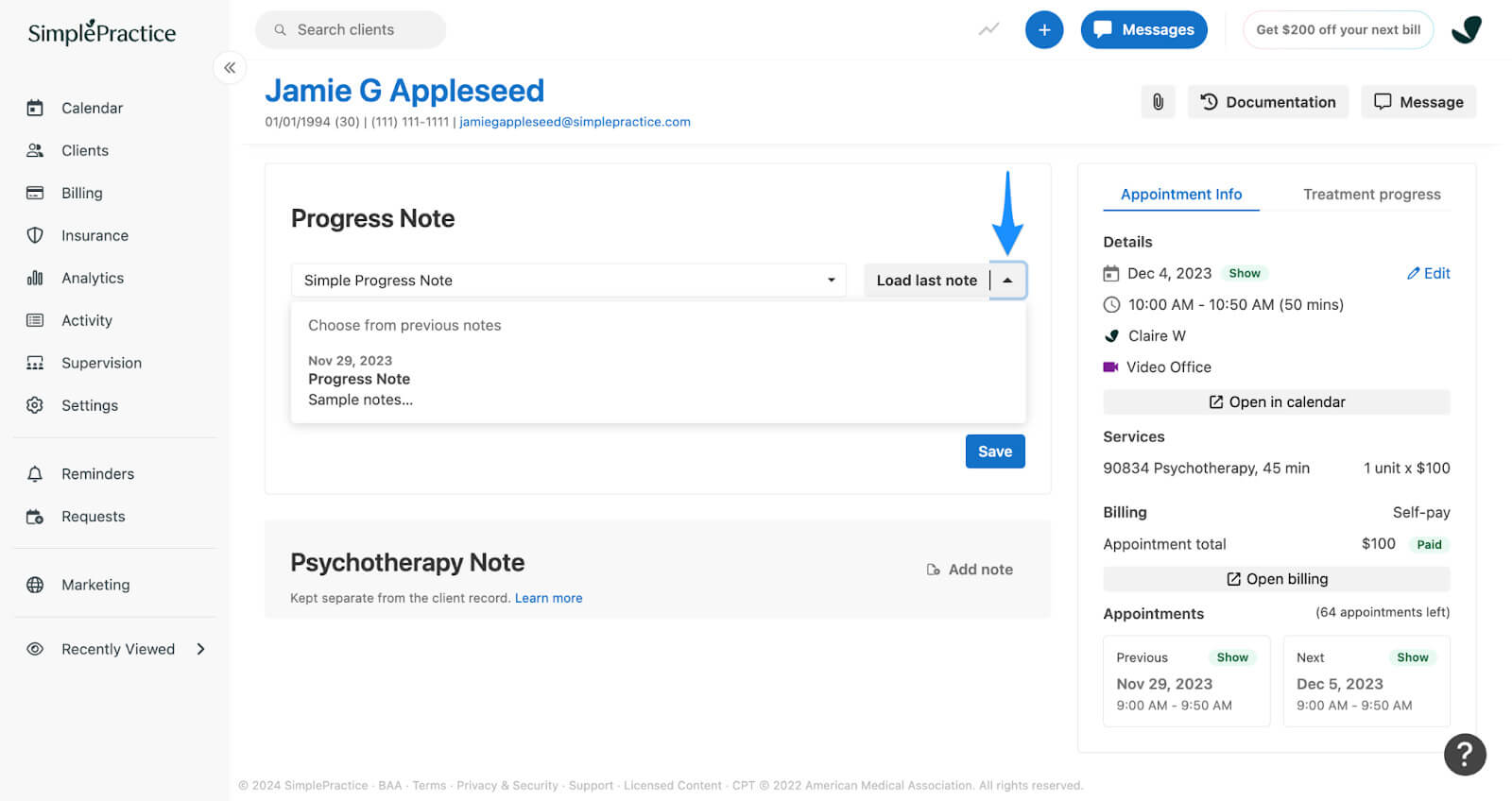
SimplePractice is a cloud-based practice management platform used by healthcare providers across several disciplines. It includes structured SOAP note templates within a broader system that handles scheduling, billing, telehealth, and client communication.
The documentation workflow is template-driven and designed to keep notes organized and consistent. Clinics that prefer an all-in-one platform without specialty-specific limitations often choose SimplePractice for centralized operations.
Features & Pros
- Pre-built SOAP templates covering standard clinical documentation formats
- Custom template builder for creating reusable note structures
- Auto-save and draft functionality to prevent data loss
- Template cloning to duplicate and modify prior notes quickly
- Secure client portal connected directly to documentation and messaging
- Integrated telehealth sessions with documentation access in the same system
- Mobile app access for reviewing and completing notes remotely
- Cloud-hosted platform with encrypted data storage
Cons
- Template setup can feel difficult at first
- Pricing increases may not suit solo providers
- Interface is more optimized for mental health workflows
Capterra Rating: 4.6/5
Pricing: Starts around $24.50/month.
9. Myzhealth: Best for Chiro SOAP Templates

Myzhealth is a chiropractic-focused EHR that centers its documentation around structured exam and visit workflows. It integrates SOAP notes directly into patient records, billing, and scheduling.
The system emphasizes organized charting tied closely to clinical assessments and care plans. Clinics that want documentation built specifically around chiropractic exams and reporting often look at Myzhealth as a workflow-driven solution.
Features & Pros
- Integrated SOAP documentation within chiropractic-focused EHR
- Structured note templates aligned with chiropractic assessments
- Click-to-select subjective findings, scales, treatments, assessments, and plans
- Minimizes typing with point-and-click documentation workflows
- SALTing functionality to auto-populate objective findings, history, assessment, and plans
- One-click population of common exam elements to reduce repetitive entry
- Allows clinicians to review and edit notes before finalizing
- Connects documentation directly with billing and patient records
Cons
- May require onboarding support for setup
- AI voice-based drafting features are limited or unclear
Capterra Rating: 4.6/5
Pricing: Starts at $129/month.
10. Jane App: Best for Flexible Charting With Form Integration

Jane is a cloud-based practice management platform used across multiple healthcare disciplines. Its charting system focuses on flexible note creation combined with customizable intake forms and documentation tools.
Clinics can build templates, duplicate past notes, and link documentation directly to appointments and billing. Jane is often chosen for its clean interface and structured form integration that keeps client records organized and easy to access.
Features & Pros
- Customizable chart templates for SOAP and other documentation styles
- Ability to duplicate previous notes to speed up repetitive charting
- Integrated intake forms that flow directly into the patient chart
- Secure client portal connected to documentation and messaging
- Drag-and-drop form builder for structured documentation workflows
- Charting linked directly to scheduling, billing, and client records
- Cloud-based access across desktop, tablet, and mobile devices
- Encrypted data storage aligned with healthcare compliance standards
Cons
- Pricing can increase as more practitioners are added
- Some users report limitations in advanced reporting features
- Customization depth may require time to configure properly
Capterra Rating: 4.8/5
Pricing: Starts at $54/month per practitioner.
How to Choose the Right Chiropractic SOAP Note Software for Your Clinic
When selecting chiropractic SOAP note software, focus on the factors that directly affect documentation speed, compliance, and daily workflow. The right system should reduce charting time, improve accuracy, and connect smoothly with the rest of your clinic operations. These are the key areas to evaluate:
Structured Clinical Templates
Choose software that lets you build structured note templates with a SOAP widget that can be added directly into the template. This makes it easier to document subjective, objective, assessment, and plan details in a clear format without rebuilding your notes each time. It is especially useful when creating templates for exams, re-exams, and daily visits.
Customization Flexibility
Your documentation style is personal. Select a system that allows you to modify templates, create your own note structures, and adjust wording to match your clinical approach.
Documentation Speed
Look for tools that reduce typing and repetitive entry. Features such as macros or AI note-takers should help you complete notes during or immediately after visits.
Security and Compliance
Ensure the platform meets HIPAA or PIPEDA standards. Confirm secure cloud storage, encryption, and BAA availability before storing patient data.
Device Accessibility
Choose software that works across desktop, tablet, and mobile devices. This is especially important for mobile chiropractors or clinics with multiple treatment rooms.
Reporting and Audit Support
The system should make it easy to retrieve documentation for audits or reviews. Organized, searchable notes save time when compliance questions arise.
The right chiropractic SOAP note software should support your clinical reasoning, reduce after-hours charting, and protect your clinic from documentation gaps.
Which Chiropractic SOAP Note Software Is Best for Your Needs?
Choosing the right chiropractic SOAP note software directly impacts how efficiently your clinic runs each day. A strong documentation system should help you complete notes on time, maintain organized records, and connect smoothly with billing and compliance processes.
When charting supports your workflow, you spend less time correcting errors and more time focusing on patient care.
Every clinic operates differently, so the best solution depends on how you document exams, assessments, and treatment plans. Some clinics need deeper customization, while others prioritize speed or AI-supported note-taking.
The most important factor is alignment with your real workflow. When software fits naturally into your day, documentation stops extending into your evenings and starts working in your favour.
FAQ
Are AI-powered SOAP notes accurate enough for clinical use?

Which platform is best for reducing after-hours charting?
How difficult is it to switch SOAP note systems?
Share





.webp)
.webp)
.webp)