

Top 8 Medical Billing Software to Simplify Your Practice in 2026

Running a healthcare practice means dealing with more than patient care. Billing errors, rejected insurance claims, and admin delays drain your time and money. The US healthcare system bleeds up to $5 million weekly from billing mistakes alone.
The right medical billing software stops these costly problems. It cuts administrative headaches, speeds up claim submissions, and improves your cash flow. Pick the right solution, and you spend more time with patients and less time buried in paperwork.
This guide breaks down the top 8 medical billing software tools that simplify your practice's billing. Solo practitioner or a larger clinic, there's a solution built for how you work.
List of 8 Medical Billing Software
We’ve compiled a list of the top medical billing software options after extensive research through forums and firsthand feedback from practices. These tools stand out based on real-world performance and user experience.
Here’s a sneak peak first:
| Tool Name | Best For | Capterra Rating | Pricing |
| Noterro | Billing, insurance, practitioner management | 4.5/5 | Starts at $28.05/month (14-day free trial) |
| AdvancedMD | Claims management | 4.3/5 | Custom pricing |
| EZClaim | Partnering with EHR systems | 4.1/5 | Starts at $169/month/single user |
| PracticeSuite | Unified, synchronised workflow | 4.2/5 | Custom pricing |
| eClinicalWorks | Billing, financial reporting | 4.5/5 | Starts from $599/month/provider |
| DrChrono | Flexible billing, mobile access | 4.6/5 | Custom pricing |
| CareCloud | Revenue cycle management | 4.3/5 | Custom pricing |
| CollaborateMD | Billing & electronic claim submission | 4.0/5 | Starts at $255/month |
1. Noterro - Best for Solo and Small Clinics

Noterro is an all-in-one medical billing platform that cuts through billing complexity for healthcare practices. From insurance claim management to payment processing, it's built to streamline tasks, reduce admin work, and boost cash flow. Integration with TELUS eClaims and Availity makes it work smoothly for both private pay and insurance billing.
Additionally, its features for membership management, AI note-taker, and many more make it a versatile and reliable tool for practices of all sizes.
Features:
- Automated Claim Management: Create, send, and track insurance claims in one place. Reduces manual work, limits errors, and speeds up reimbursements.
- Payment Integration: Syncs with Square, QuickBooks, and Xero, so tracking money doesn't become a mess.
- Insurance Integrations: Submit claims through TELUS eClaims in Canada and Availity in the US, making eligibility checks and claim follow-ups easier to manage.
- Packages and Memberships: Set up prepaid care packages and recurring memberships to support ongoing treatment plans and predictable revenue.
- Discounts and Flexible Pricing: Apply discounts and custom pricing directly to invoices without manual calculations or workarounds.
- AI-Powered Clinical Notes: Use voice-to-text charting to create SOAP notes while you work, keeping documentation connected to billing.
- Mobile Access: Create invoices, review claims, and manage patient records from your phone or tablet, whether you’re in the clinic or working remotely.
Pros:
- Budget-friendly for small to medium practices.
- Strong mobile features for managing on the move.
- Simple interface that's easy to navigate.
- 14-day free trial, no credit card needed.
Cons:
- Limited third-party integrations beyond what’s included in the software.
- Learning curve for new users unfamiliar with the interface.
Capterra Rating: 4.8/5
Pricing: Starts at $28.05/month with a 14-day free trial.
Best for: Solo clinics, small teams, and allied health providers who want an all-in-one solution for billing, insurance claims, and mobile access to manage patient records seamlessly.
Also Read: How to Handle Billing, Insurance, Cards & More As a New Practitioner
2. AdvancedMD - Best for Claims Management
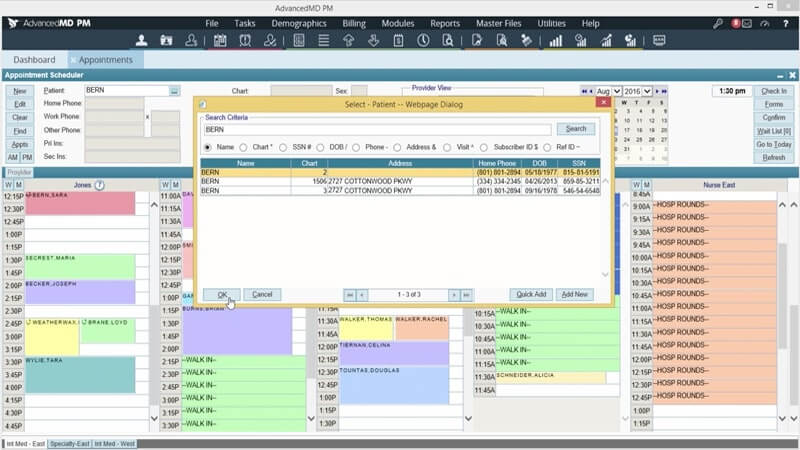
AdvancedMD tackles medical billing from every angle. It automates the tedious stuff and keeps claims, payments, and patient data organized. Real-time tracking, denial management, and solid reporting give you control. EHR integration means it plugs into practices of any size without drama.
Features:
- Real-Time Claim Tracking: Watch claims move and submit them automatically for quicker turnaround.
- EHR Integration: Plugs into your EHR without disrupting how your practice runs.
- Denial Management: Catches denied claims and shows you exactly how to fix them.
- Cloud-Based: Log in from anywhere - your office, home, or phone.
- Customizable Reporting: Build financial and billing reports that match what your practice actually needs.
Pros:
- Ideal for larger practices needing scalability.
- Excellent integration with EHR systems.
- Real-time claim tracking and automated denial management.
- Cloud-based, allowing access from anywhere.
Cons:
- Pricing may be higher for smaller practices.
- Customer support can be slow during peak times.
Capterra Rating: 4.3/5
Pricing: Custom pricing available upon request.
Best for: Larger practices or multi-location setups that need robust claims management, real-time tracking, and EHR integration to streamline their billing and improve operational efficiency.
3. EZClaim - Best for Partnering with EHR Systems

EZClaim targets small to mid-sized practices that need billing software without the hefty price tag. It handles claim management, patient billing, and reporting in ways that save time and reduce mistakes. The interface won't confuse your staff, and it links up with multiple clearinghouses. Good option if you want billing that works without the learning curve.
Features:
- Multi-Clearinghouse Integration: Send claims to multiple clearinghouses for quicker payments.
- Patient Billing and Payment Tracking: Keep tabs on patient balances and payments without confusion.
- Customizable Billing Statements: Personalise billing statements with your practice’s branding.
- Multi-User Support: Ideal for growing practices with multiple users.
- Easy Setup: Minimal setup with a straightforward user interface.
Pros:
- Affordable pricing for small practices.
- Simple and easy to use.
- Quick setup with minimal training required.
- Great for practices that need basic billing functionality.
Cons:
- Limited features for larger practices with complex workflows.
- Some users report occasional software bugs.
Capterra Rating: 4.1/5
Pricing: Starts from $169/month/single user.
Best for: Small to mid-sized practices that need a straightforward, affordable billing solution with multi-clearinghouse integration.
4. PracticeSuite - Best for Unified, Synchronised Workflow

PracticeSuite is highly customizable medical billing software for practices with specific billing needs. It integrates smoothly with EHR and patient scheduling systems to keep operations running clean. Claim submission, patient statements, and collection tracking all live in one place. The flexibility helps practices that can't squeeze into cookie-cutter billing solutions.
Features:
- Customizable Billing Workflows: Adjust the software to match how your practice actually runs.
- EHR and Scheduling Integration: Billing syncs with patient scheduling to keep workflows moving.
- Automated Claim Submission: Handles claim submissions and reduces errors automatically.
- Real-Time Reporting: Displays financial and billing data when you need to make decisions.
- Multi-Location Support: Works well for practices operating in multiple places.
Pros:
- Flexible enough to match specific practice needs.
- Works smoothly with EHR and scheduling systems.
- Multi-location support for larger practices.
Cons:
- Complex setup that may require assistance.
- Limited customer support compared to competitors.
Capterra Rating: 4.2/5
Pricing: Custom pricing available upon request.
Best for: Large practices or multi-location setups that need customizable billing workflows and seamless integration with existing EHR and scheduling systems.
5. eClinicalWorks - Best for Billing and Financial Reporting

eClinicalWorks gets a lot of use in healthcare because it plugs straight into EHR systems. Scheduling, charting, billing, and insurance claims all run through one platform. Larger practices and healthcare networks lean on it because it grows with them and handles the complex stuff without breaking.
Features:
- Complete EHR Integration: Plugs straight into your EHR and practice management tools.
- Automated Claims Processing: Submits claims, catches errors, and cleans them up on its own.
- Real-Time Payment Posting: Watch payments land in your account as they happen.
- Customizable Billing Statements: Build statements and reports around how you actually run things.
- Telemedicine Support: Drop-in virtual visits and telehealth billing with no drama.
Pros:
- Excellent for larger practices due to its scalability.
- Integrates smoothly with EHR and practice management.
- Comprehensive reporting and billing features.
Cons:
- Overwhelming for smaller practices due to its complexity.
- Customer service can be slow during peak times.
Capterra Rating: 4.5/5
Pricing: Starts from $599/month/provider.
Best for: Larger practices or healthcare networks that require scalable solutions, EHR integration, and advanced reporting to streamline billing and improve operational efficiency.
6. DrChrono - Best for flexible billing and mobile access

DrChrono offers a flexible medical billing solution with strong mobile access for practices seeking to streamline billing, practice management, and electronic health records. This cloud-based solution is ideal for practices that need flexibility and scalability, particularly for mobile or telemedicine-based care.
Features:
- Integrated Billing, EHR, and Practice Management: All your tools live in one place.
- Customizable Billing Statements: Build invoices the way your practice needs them.
- Real-Time Claim Tracking: See exactly where claims and payments stand right now.
- Mobile Access: Manage everything from your phone or tablet - works great for telemedicine or mobile practitioners.
- Scalable: Handles small practices today, expands as you grow.
Pros:
- Mobile access makes it great for on-the-go management.
- Flexible for scaling practices of different sizes.
- Cloud-based solution with remote access.
Cons:
- Learning curve for new users.
- Limited reporting features compared to other tools.
Capterra Rating: 4.6/5
Pricing: Custom pricing available upon request.
Best for: Practices that need flexibility, especially mobile care providers or telemedicine services, with the ability to manage billing, scheduling, and patient records from anywhere.
7. CareCloud - Best for revenue cycle management

CareCloud runs cloud-based medical billing that modernises how healthcare providers handle their money. Automated claims processing, patient billing, and integrated reporting help practices improve revenue cycles and lighten admin workload. The interface is simple to use, and cloud access means you can pull up data from anywhere.
Features:
- Automated Claims Submission: Send and track claims without manual work.
- Integrated EHR: Links with your EHR so workflows don't break.
- Customizable Patient Billing Statements: Create billing statements that fit your practice setup.
- Real-Time Reporting and Analytics: See what's happening with your money right now.
- Cloud-Based: Log in from anywhere - office, home, or your phone.
Pros:
- Cloud-based solution, enabling remote access for your team.
- Helps improve revenue cycle management through automation.
- Real-time reports and analytics for financial insights.
Cons:
- Some advanced features can be costly for smaller practices.
- Customer support options are limited during non-business hours.
Capterra Rating: 4.3/5
Pricing: Custom pricing available upon request.
Best for: Practices focused on improving revenue cycle management with cloud-based billing solutions and real-time reporting.
8. CollaborateMD - Best for Billing and Electronic Claim Submission

CollaborateMD cuts through billing complexity for small to mid-sized practices. The tools handle patient billing, claims, and payments without creating chaos. Real-time claim tracking, automated patient billing, and denial management keep things moving. Multi-user access lets growing teams work on billing together without collisions or confusion.
Features:
- Real-Time Claim Status Tracking: See where claims are right now for quicker fixes.
- Automated Billing: Handles patient billing and payment reminders on its own.
- Multi-User Access: Multiple team members can work simultaneously without conflicts.
- Cloud-Based: Use it from any device - phone, tablet, or computer.
Pros:
- Simple and easy-to-use interface.
- Affordable pricing for small to mid-sized practices.
- Multi-user access for team collaboration.
- Cloud-based solution, accessible from any device.
Cons:
- Limited reporting features compared to other platforms.
- Learning curve for new users getting familiar with the interface.
Capterra Rating: 4.0/5
Pricing: Starts at $255/month.
Best for: Small to mid-sized practices that need affordable billing software with real-time claim tracking and multi-user access for team collaboration
Bonus read: 16 Practice Management Software Features Chiropractors Shouldn’t Ignore
What to Look for in the Best Medical Billing Software
Choosing the right medical billing software doesn’t have to be overwhelming. Keep these key factors in mind:
- Features: Find tools that cover claim submission, payment tracking, denial management, and connect with your EHR and scheduling systems.
- Ease of Use: Pick software with a clear interface and solid training materials. Complicated tools waste your time.
- Scalability: Make sure it grows with your practice - more claims, users, and locations without breaking.
- Customer Support: You need reliable support when problems hit. Check if help is actually accessible.
- Cost: Look past the sticker price. Hunt for hidden fees and figure out if the time savings justify the investment.
- Integration: It should plug into your current tools - EHR, financial management - without creating headaches or errors.
And here’s a tip:
Involve your team—practitioners, admins, and billing staff—in the decision-making process. Their input can help you find the best fit for your practice!
Bonus Read: 11 Billing Tips for Mobile & Multi Practitioner & Location Clinics
Why You Need Reliable Medical Billing Software for Healthcare Practices
Unreliable billing can cause major headaches for the practitioners. Investing in a reliable medical billing platform can transform your clinic’s operations, reducing errors and saving valuable time.
Here are the reasons why:

Helpful read: 9 Chiropractic Billing & Coding Red Flags (And How to Avoid Them)
Which Medical Billing Software is the Best?
Option A: Noterro
Need an all-in-one solution that handles billing, insurance claims, and patient scheduling without complexity? Noterro works for solo practitioners and small clinics that need reliable software without the massive price tag. It links up with Square, QuickBooks, and Xero without fighting you. Manage your practice from your couch, your car, or wherever you happen to be.
Option B: AdvancedMD
Running a larger practice or dealing with complex billing workflows? AdvancedMD delivers deep customisation and powerful claims management. It's built for practices needing robust EHR integration, real-time claim tracking, and detailed reporting. Multiple locations or intricate billing requirements? AdvancedMD handles it.
Option C: EZClaim
Small practice or just starting with billing software? EZClaim offers affordability and simplicity. Designed for small to mid-sized practices that need straightforward tools without the bells and whistles. Multi-clearinghouse integration and customizable statements keep billing running smoothly on a budget.
Pick what fits your practice. Size matters, complexity matters, and your specific headaches matter most. Run the free trials, see which one actually makes your day easier, and choose whatever stops billing from eating your time. The right tool means less paperwork chaos and more hours with actual patients.
FAQ
What are the different types of medical billing software?

How secure is the data stored in medical billing software?
How do I know which billing software fits a small practice like mine?
Will my existing patient data transfer into a new billing system?
How does billing software help reduce rejected or denied claims?
How much training will my staff need to use a new billing system?
Share





.webp)
.webp)
.webp)