No items found.
Free Webinar · May 7 · How to Get (and Keep) More Patients as a Practitioner →
Save Your Spot


Table of Contents

Experience Better Practice Management Today!
Starting at $28.05/month
No Credit Card Required
Experience Better Practice Management Today!
Starting at $30/month
No Credit Card Required
Jane App is a familiar name in healthcare software, but it does not work equally well for every clinic.
Many smaller practices run into the same issue. The price climbs as the clinic grows, while several features go unused. Over time, the system can feel heavier than necessary.
One former Jane App user summed it up this way: “Jane was too expensive for my small business, and the extra features were not worth the cost.”
If you need better scheduling, advanced billing, or a mobile-friendly solution, several Jane App alternatives can perfectly fit your practice.
Administrative work remains a major burden in healthcare. According to the American Medical Association, clinicians spend nearly two hours on administrative tasks for every hour of patient care. Small clinics often feel this strain first, which is where clinic management platforms come in.
These tools were selected based on ease of use, pricing, patient management, and how well they support real clinic workflows.
The goal here is not to list every available feature. It is to help you find software that fits how your clinic actually operates.
| Tool | Best For | Pricing | Capterra Rating |
|---|---|---|---|
| Noterro | Solo practitioners and small clinics | $28.05/month with 14-day free trial | 4.8/5 |
| CareCloud | Revenue cycle management | $349/month/provider | 3.5/5 |
| Juvonno | SOAP notes | $49/month | 4.5/5 |
| Power Diary | Appointment scheduling | $9/month/user | 4.6/5 |
| ClinicSense | Client communication | $25/month | 4.8/5 |
| WriteUpp | Workflow automation | $33/month | 4.7/5 |
| Medesk | Patient portal | $5/month | 4.7/5 |
| MassageBook | Massage therapists | $20/month | 4.7/5 |
| Cliniko | Small clinics | $45/month/practitioner | 4.7/5 |
| SimplePractice | Mental health and cash-based clinics | $29/month | 4.6/5 |

Noterro fits solo practitioners and small clinics hunting for flexible, straightforward clinic management. The interface makes sense, mobile works great, and patient records, scheduling, and billing flow without friction.
Why Choose Noterro?
Noterro shines for mobile healthcare practices needing HIPAA/PIPEDA-compliant patient data management on the move.
Whether you're running a small clinic or a growing practice, customizable features and AI-driven tools like the AI note-taker streamline operations and cut administrative burden. Here’s what a former Jane App user has to say after switching to Noterro:
“I’m not tech-savvy, but compared to Jane App, Noterro is so much more user-friendly and intuitive. The support team is always there to walk me through any issues.”
- Lianne W., Doctor of Acupuncture and CranioSacral Practitioner
Key Features:
Pros:
Cons:
Capterra Rating: 4.8/5
Price: Starts at $28.05/month with a 14-day free trial.
Best for: Solo practitioners, mobile clinics, and small teams that want flexible clinic management without added admin work.
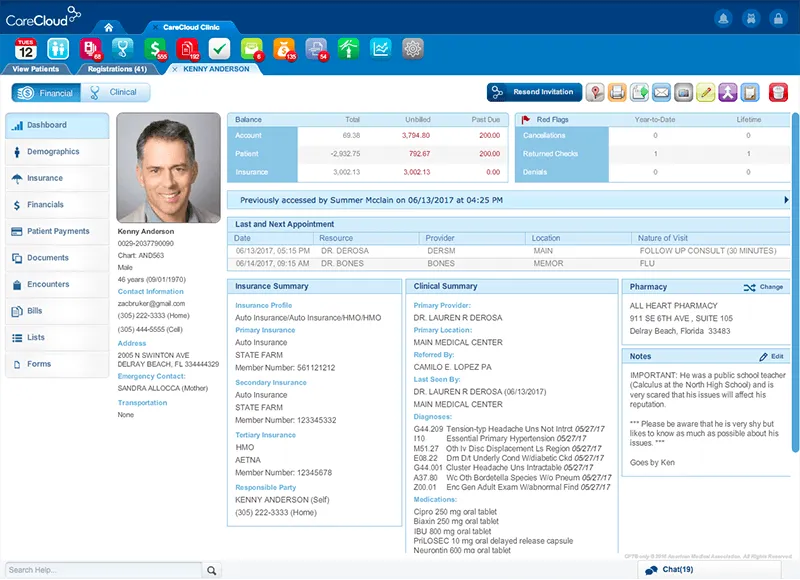
CareCloud is a Jane App alternative built for clinics that place a strong focus on billing, claims, and financial reporting. It is designed for practices that handle high insurance volume and need tighter control over revenue workflows.
Why Choose CareCloud?
CareCloud solves your clinic's financial challenges with robust revenue cycle management. It cuts through billing mess, claims processing headaches, and financial reporting chaos so your clinic runs smoothly and makes money. Want cleaner financial workflows and better revenue? CareCloud handles clinic finances without the usual pain.
Features
Pros
Cons
Capterra Rating: 3.5/5
Pricing: Starts at $349/month per provider
Best for: Mid-sized to large clinics that rely heavily on insurance billing and need dedicated revenue cycle management tools.

Juvonno is a strong Jane App alternative for clinics that rely heavily on SOAP notes and want more control over documentation.
It supports customizable charting and intake workflows, so clinics can match notes to how care is actually delivered. Juvonno also includes scheduling, reminders, and patient portal features, so you do not need separate tools for basic operations.
Why Choose Juvonno?
Juvonno stands out for its robust SOAP note functionality, enabling practitioners to create highly detailed, customizable documentation tailored to their practice’s specific needs. Its automated appointment reminders and patient portal simplify communication, while its billing and insurance claim processing tools enhance efficiency across the clinic.
Features
Pros
Cons
Capterra Rating: 4.7/5
Pricing: Starts at $49 USD/month (billed yearly)
Best for: Clinics that document heavily and want customizable SOAP notes, intake forms, and charting without stitching together multiple tools.

Power Diary is a Jane App alternative for clinics wanting solid scheduling without heavy billing or insurance tools. It works for small teams valuing clear calendars and simple booking rules.
The platform focuses on appointment management, reminders, and patient records. Clinics already using separate billing systems often pick Power Diary for exactly this reason.
Why Choose Power Diary?
Power Diary handles scheduling for clinics tired of complicated systems. Appointment booking makes sense, reminders go out automatically, and patient records adjust to how you work. Small to medium practices use it to stay organised without drowning in admin work. More time with patients, less time fighting software - that's why clinics switch from Jane App.
Features
Pros
Cons
Capterra Rating: 4.6/5
Pricing: Starts at $9/month per user
Best for: Small clinics and solo practitioners that want straightforward scheduling without complex billing needs.

ClinicSense is a Jane App alternative focused on patient communication and appointment follow-through. It is built for clinics that want to reduce no-shows and keep client messaging simple and consistent.
Smaller practices often choose ClinicSense when reminders, forms, and basic billing matter more than complex workflows.
Why Choose ClinicSense?
ClinicSense works for clinics that care about client communication and patient engagement. Automated reminders, secure patient records, and streamlined invoicing cut missed appointments while improving patient satisfaction.
The system stays simple but effective, fitting smaller practices managing appointments and client communication efficiently. It handles administrative tasks so you focus on delivering quality care.
Features
Pros
Cons
Capterra Rating: 4.8/5
Pricing: Starts at $25/month
Best for: Small clinics and solo practitioners that want clear client communication and fewer missed appointments.
Also Read: ClinicSense Alternatives: Top 10 Picks for 2026

WriteUpp is a Jane App alternative built for clinics that want to reduce manual admin tasks. It focuses on automating scheduling, reminders, and internal workflows so staff spend less time on routine work.
The platform suits clinics that want structure around daily operations without managing several disconnected tools. It is commonly used by small to mid-sized practices.
Why Choose WriteUpp?
WriteUpp takes care of the tedious stuff clinics deal with daily. Scheduling appointments, talking to patients, sending reminders, and pulling reports all happen without you babysitting the process. Clinics that use it spend less time wrestling with administrative tasks and more time actually treating patients. That's why some practices ditch Jane App for it.
Features
Pros
Cons
Capterra Rating: 4.7/5
Pricing: Starts at $25.59/month
Best for: Clinics that want to automate routine tasks and bring structure to scheduling and patient communication.

Medesk is a Jane App alternative designed for clinics that prioritise patient access and communication. Its core strength is a secure patient portal that allows patients to manage appointments, forms, and messages in one place.
Clinics that want patients to stay informed and involved between visits often choose Medesk. The platform also includes scheduling and reporting tools to support daily operations.
Why Choose Medesk?
Medesk handles clinic management with a focus on patient engagement and data privacy. Secure patient portal, scheduling tools, and medical CRM simplify operations while improving communication and patient relationships. Customizable notifications and data-driven insights help clinics work more efficiently while maintaining tight security.
Features
Pros
Cons
Capterra Rating: 4.7/5
Pricing: Starts at $5/month
Best for: Clinics that want a strong patient portal and clear communication tools without complex workflow automation.

MassageBook is a Jane App alternative designed specifically for massage therapists and bodywork professionals. It focuses on booking, client communication, and basic business tools that support solo and small massage practices.
Clinics that offer massage as their primary service often choose MassageBook because it aligns closely with how massage businesses operate day to day.
Why Choose MassageBook?
MassageBook is built for massage therapists and bodywork professionals who need clinic management without complexity. Solo practitioners and small massage clinics use it for straightforward appointment scheduling, client communication, and marketing. Secure client records and integrated invoicing make it a solid Jane App alternative for massage and wellness pros.
Features
Pros
Cons
Capterra Rating: 4.7/5
Pricing: Starts at $20/month
Best for: Massage therapists and small massage clinics that want booking, communication, and basic marketing tools in one system.

Cliniko is a Jane App alternative built for clinics that want a simple and stable system. It focuses on core clinic tasks without adding unnecessary features.
Small clinics often choose Cliniko when they want predictable scheduling, basic billing, and secure patient records in one place.
Why Choose Cliniko?
Cliniko targets small clinics and solo practitioners who need management tools without the headache. The interface won't confuse you, patient records stay secure, scheduling bends to fit your needs, and reminders go out on their own. Clinic operations keep moving without drowning you in features you'll never use. Practitioners pick it when they want things to work without spending weeks figuring out the software.
Features
Pros
Cons
Capterra Rating: 4.7/5
Pricing: Starts at $45/month per practitioner
Best for: Solo practitioners and small clinics that want a straightforward system without feature overload.
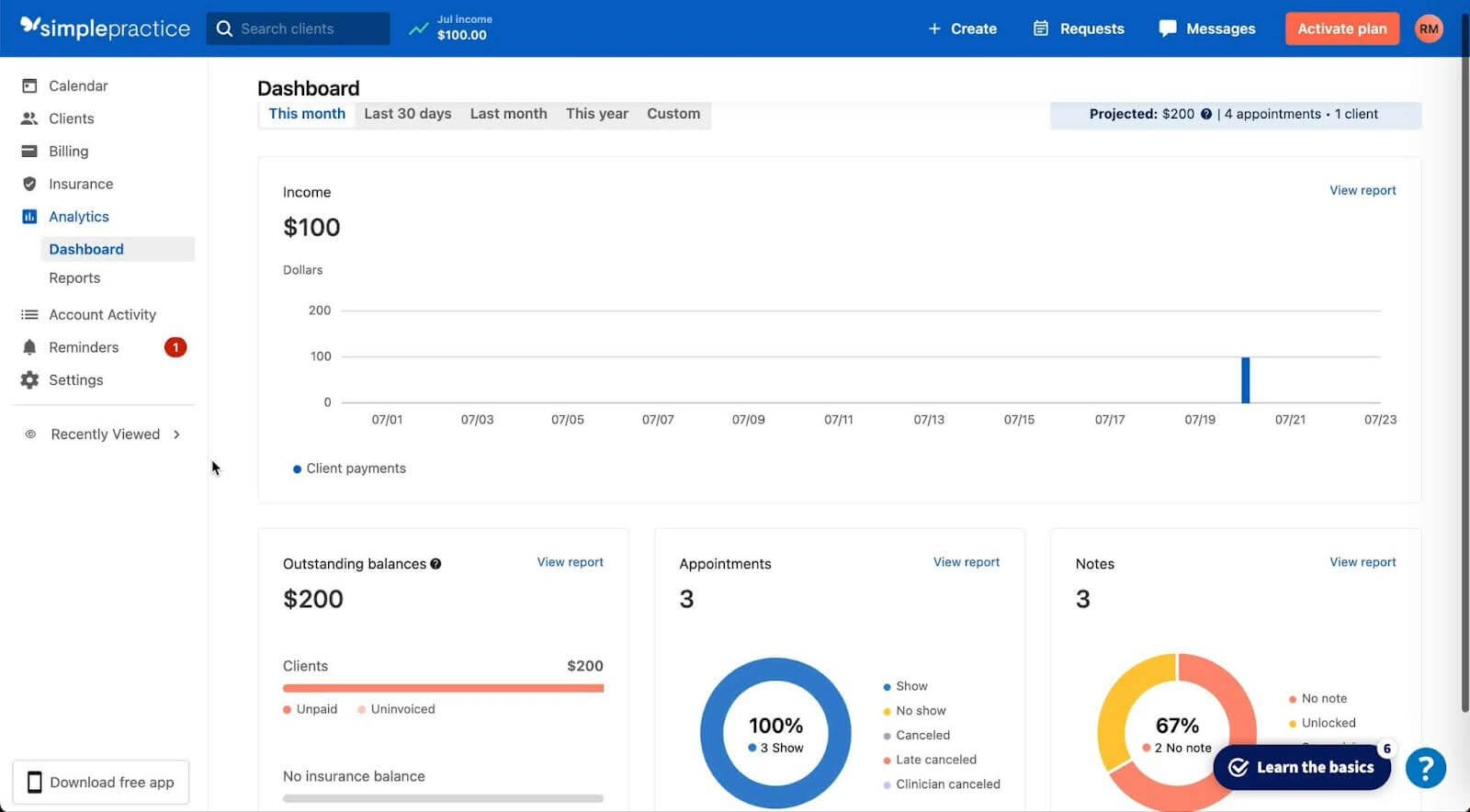
SimplePractice is a Jane App alternative often used by mental health and cash-based clinics. It focuses on scheduling, notes, payments, and telehealth in one system.
Clinics that offer therapy or counselling choose SimplePractice because video visits, intake forms, and billing are built in. It is less suited for insurance-heavy workflows and works best for session-based care.
Why Choose SimplePractice?
SimplePractice fits clinics that run on scheduled sessions and direct payments. It keeps appointments, notes, payments, and telehealth in one place, which reduces the need for extra tools.
Features
Pros
Cons
Capterra Rating: 4.6/5
Pricing: Starts at $29/month
Best for: Mental health professionals and cash-based clinics that rely on telehealth and simple session management.
Choosing the right software comes down to how your clinic actually operates. The goal is to have fewer gaps, less admin work, and tools that support your daily workflow without getting in the way. The points below help narrow options based on practical clinic needs.
With this discussed, let’s see who the winners are of our list of top Jane App alternatives.
The best Jane App alternative depends on how your clinic actually runs. Size, services, and workflow beat long feature lists every time. Here are two options that work for most small and mid-sized practices.
Noterro fits solo practitioners, mobile clinics, and small teams wanting flexibility without the chaos. It handles scheduling, billing, documentation, and patient communication in a single place. Mobile clinics love Noterro GO for off-site care and location-based booking. You also skip paying extra for core features that other platforms charge add-on fees for.
Cliniko works well for clinics that prefer a simple and predictable setup. It focuses on scheduling, records, and reminders without adding advanced tools that some clinics may not need. For small clinics with steady workflows, Cliniko can feel easier to manage over time.
If your clinic values flexibility, mobility, and broader functionality, Noterro is often the better fit. If simplicity is the top priority and your needs are limited, Cliniko may be enough.
The best choice is the one that fits how your clinic runs. Pay attention to what slows you down today, try the free trials, and stick with the option that feels easier to use. Good software should stay out of the way and give you more time with patients, not more time on screens.

Tags
Ryan Barichello, Co-Founder of Noterro, is a dynamic leader with a vision for innovation and excellence in the tech industry. With both a Business and Computer Science diploma from Mohawk College, Ryan has honed his business and software development expertise.
His leadership and dedication have garnered him several prestigious awards, including the 2018 Fast 40 Hamilton issued by Hamilton Economic Development. He also received the 2015 Outstanding Small Business of the Year from the Stoney Creek Chamber of Commerce and the 2013 Hamilton Top 40 Under 40 from Business Link Media.
Beyond his professional achievements, Ryan is deeply involved in community initiatives. As a board member of Festitalia for 9 years, he actively promoted Italian culture and heritage in the community. He also has spent time volunteering as a mentor in Greater Hamilton Teaching Youth Entrepreneur Program (M.I.G.H.T.Y), nurturing the next generation of leaders.
With a keen eye for detail and a disciplined approach, Ryan tackles challenges with precision, ensuring that every project he undertakes is a resounding success. Ryan's strategic mindset and passion for entrepreneurship have been instrumental in propelling Noterro to the forefront of the industry.
Driven by a relentless pursuit of excellence, Ryan is passionate about technological innovation. His expertise in addressing complex challenges with precision, alongside his dedication to innovation, sets him apart as a leader in the technology field.


.webp)
No credit card required. Available 1-on-1 support.
.webp)
No credit card required. Available 1-on-1 support.
.webp)
.webp)



.webp)