

Top Reasons to Switch to Secure Cloud-Based Software for Chiropractors

Protecting patient data sounds simple until you look closely at how your clinic actually handles access, backups, and updates.
Many chiropractors I’ve spoken with assumed their cloud clinic management software was secure, but few had reviewed what that actually meant in day-to-day operations. Shared logins, manual processes, and growing teams can quietly increase risk.
In this article, you’ll learn how to:
- Define what real cloud security looks like in a chiropractic clinic
- Reduce exposure as your team grows or changes
- Strengthen data protection without relying on memory
- Support mobile and multi-location workflows safely
- Plan a structured migration without disrupting care
You’ll walk away with a clearer way to evaluate your current system and decide if it truly protects your clinic.
What Secure Cloud Software Actually Means for Chiropractic Clinics
When vendors say “secure,” it often sounds reassuring but unclear.
In your clinic, security should be practical. You should know exactly where patient data is stored, how it is protected, and whether anything depends on someone remembering to run a backup or install an update.
Secure cloud software should include:
- Encrypted storage for patient records
- Secure data transfer between users and devices
- Automatic backups that run without staff involvement
- Access based on each team member’s role
When your chiropractic clinic management software automatically handles these protections, your team does not have to rely on habits or manual processes to safeguard patient information.
If your current system still relies on shared logins, local servers, or manual oversight, your cloud security may not align with the risks in your clinic.
You might want to check this out: The Chiropractor’s Guide to Compliance and Malpractice Coverage
Top Reasons Chiropractors Switch to Secure Cloud Software
Reason 1: Clear Control Over Who Can Access Patient Data
Shared logins still exist in many clinics, especially when teams are small and moving fast. It feels efficient because everyone can access the system without friction.
The risk arises when roles change, or someone leaves, and no one reviews access. That is how exposure builds inside your chiropractic software without anyone noticing.
Secure cloud software structures access by role. So, instead of everyone seeing everything, access is defined by role.
That usually means:
- Front desk staff manage scheduling and billing
- Practitioners access clinical documentation
- Owners control financial and reporting permissions
In a chiropractic practice management solution like Noterro, access is based on what each practitioner is allowed to see in the system, and those access levels can be updated when needed. That helps solo clinics, growing teams, and multi-practitioner setups maintain clearer control as visibility needs change over time.
can be changed immediately. That protects solo clinics, growing teams, and multi-practitioner setups where responsibilities shift often.
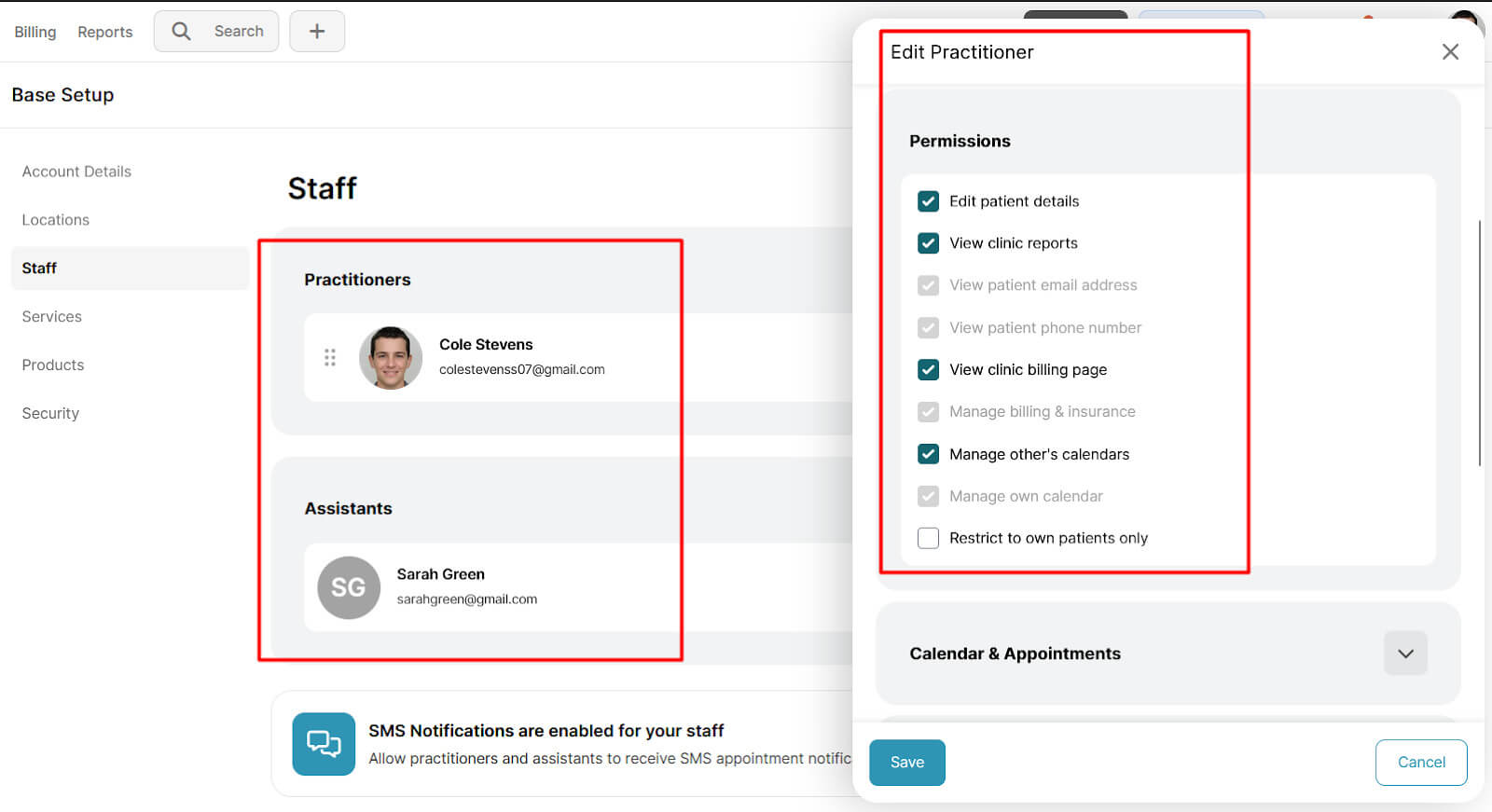
Pro Tip: Once a quarter, review your active user (practitioner) list and confirm that each login matches an active team member and practitioner in your clinic. You should also do this as soon as a practitioner leaves the clinic, so former staff do not retain unnecessary access.
Reason 2: Stronger Data Protection Without Manual Oversight
When I talk to clinics that switched to Noterro, some came from locally hosted or on-premise systems.
In those setups, someone at the clinic was responsible for backups and updates. That responsibility sat with the owner, an admin, or an outside IT provider. If it was delayed, patient data protection was affected. Secure cloud software removes that dependency.
- Data is stored in encrypted systems
- Transfers happen through secure connections
- Backups run automatically in the background
Your team does not manage servers or external drives.
With Noterro, PHI is stored in our infrastructure partner, Amazon Web Services. Noterro complies with HIPAA and PIPEDA requirements, so clinics do not need to maintain PHI infrastructure themselves.
If you are not sure how your current system handles backups or where your data is stored, that is the first place to look.
Reason 3: Safer Support for Mobile and Hybrid Chiropractic Care
Mobile access changes how your system needs to behave. When practitioners chart from home, between locations, or on mobile devices, protection must remain consistent. Older systems were often built for in-clinic networks and struggle outside that setup.
A secure cloud clinic management solution helps keep access tied to individual user accounts instead of shared devices, which is especially important for mobile and hybrid care models.
It should also support safeguards that reduce the risk of unauthorized access when staff are logging in from different places or devices.
In Noterro, features like two-factor authentication and automatic log-out can help add that extra layer of protection. That matters for hybrid practice owners and mobile chiropractors who need secure access without relying on a fixed in-clinic setup.
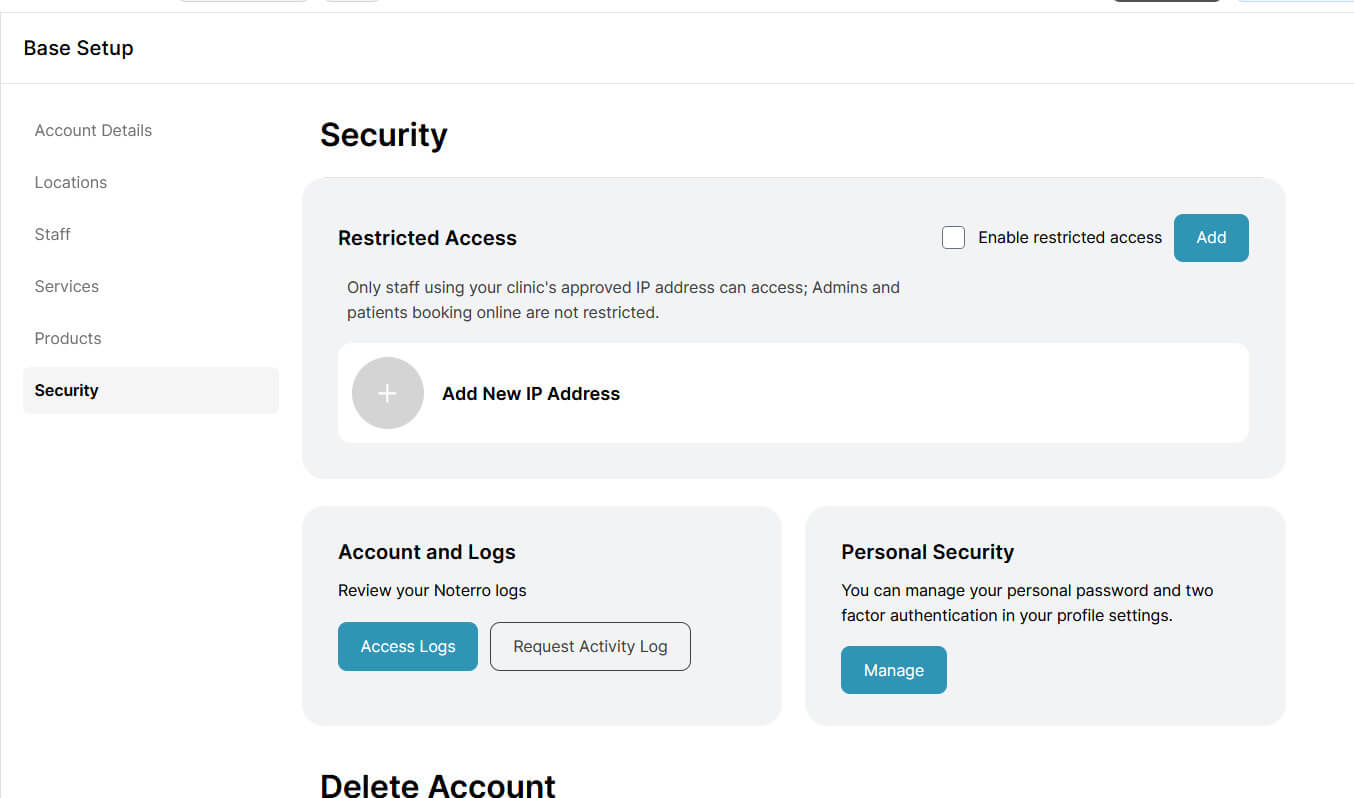
If your clinic operates across multiple settings, your cloud security should stay reliable wherever care happens.
Related read: How to Maximize Mobile Chiropractic Practice Growth with Patient Retention
Reason 4: Reduced Risk During Staff Changes and Turnover
Staff changes are part of running a clinic, especially as your team grows or shifts roles. Exposure occurs when system access is not reviewed immediately after someone leaves. I have spoken with clinic owners who later realized former staff still had login credentials long after their departure.
A cloud-based tool allows you to deactivate accounts immediately without relying on external IT support. Access removal becomes part of your internal process instead of a delayed technical task.
Systems like Noterro also include access logs that show who accessed your clinic account and when the activity occurred. That visibility closes one of the most common security gaps I hear about in conversations with chiropractors.
If someone leaves your team, their access to patient data should end that same day without exception.
Another helpful read: The Chiropractor’s Guide to Managing Staff Schedules Without the Stress
Reason 5: Better Security as Clinics Grow or Add Locations
As your clinic grows, your system naturally becomes more complex. More practitioners add user accounts, and more administrators add permission layers. Adding another location brings new devices and workflows that need to stay aligned.
Issues usually start when each location manages access a little differently. One site may carefully lock down financial data, while another applies looser controls. That inconsistency creates exposure you may not notice right away.
A cloud practice management solution for chiropractors can help reduce that risk by keeping security settings and access controls consistent across the business. In Noterro, the security configuration applies across the system, helping clinics maintain a more standardized approach as they grow.
Before expanding, decide how access will work across every location. Growth should strengthen your control over patient data, not weaken it.
Reason 6: Built-In Accountability and Visibility
When something changes inside your system, you should be able to see what happened without guessing.
Without activity tracking, clinics rely on memory to understand who edited a chart or adjusted a setting. That slows resolution and can create tension within the team.
Modern cloud-based platforms like Noterro record access logs. You do not need to constantly monitor your staff. You just need accurate records when questions arise.
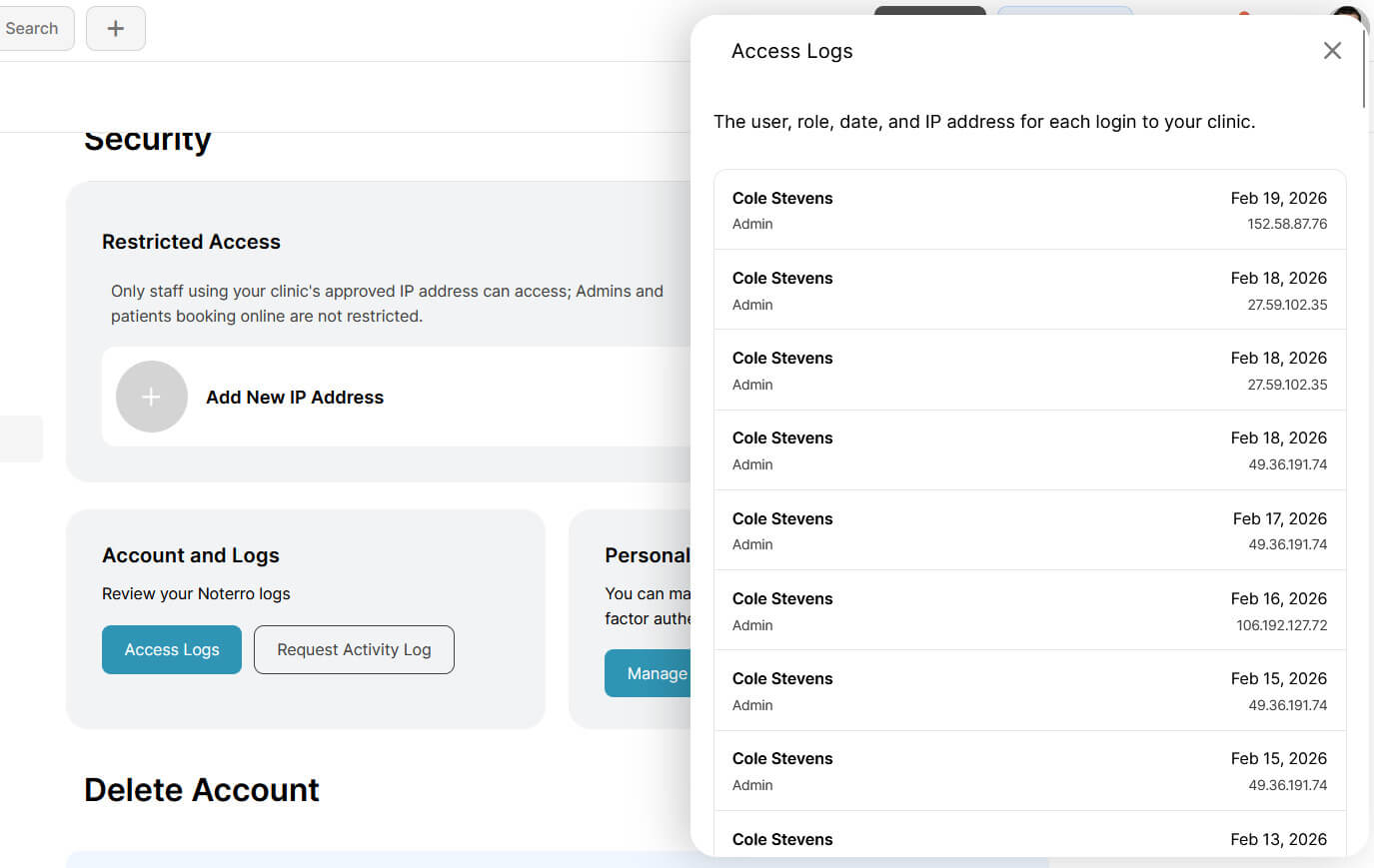
This visibility supports compliance and protects your clinic during audits or internal reviews. When actions are traceable, discussions stay factual instead of emotional.
An interesting read: How to Build a Modern Chiropractic Practice with Automation
Reason 7: Lower Long-Term Risk Compared to On-Premise Systems
On-premise systems place infrastructure responsibility on the clinic.
That responsibility includes hardware maintenance, security patch installation, and server reliability. When something fails, the clinic absorbs the disruption and the cost.
A cloud-based practice management platform handles security updates as part of the service. Clinics do not manage servers or install patches manually. Protection is maintained within the system itself.
If you are evaluating risk, look at three areas carefully:
- Who installs your security updates
- What hardware is your clinic responsible for maintaining
- How quickly are issues resolved when something fails
Pro Tip: Write down your current update and backup process step by step. If the process depends on reminders or outside coordination, that dependency carries risk.
Bonus read: How to Prevent Burnout as a Chiropractor: 8 Simple Tips
What a Safe Migration to Cloud Clinic Management Tool Looks Like For Chiros
Switching to a cloud-based chiropractic practice management software should protect patient care and data integrity at every step. If you follow a structured migration, it will reduce disruption and prevent avoidable errors.
- Data review: Audit your current system in detail before migration begins. Confirm which patient records, financial reports, billing histories, consent forms, and schedules must transfer to maintain compliance and operational continuity.
- Data prioritization: Migrate active patient files, current treatment notes, upcoming appointments, and outstanding balances first. These directly affect daily care delivery and revenue flow.
- Data cleanup: Remove redundant templates, duplicate records, inactive patients, and outdated workflows unless legally required. Cleaning data before migration prevents clutter and confusion inside the new system.
- Clinic continuity: Plan migration phases so your clinic continues booking, charting, billing, and collecting payments without interruption. Patient experience should remain unchanged during transition.
- Access testing: Validate user permissions carefully before launch. Each practitioner, administrator, and owner should see only what aligns with their role and responsibility.
- Team readiness: Provide hands-on training before go-live. Staff should practice scheduling, charting, billing, and reporting workflows in advance to prevent first-week slowdowns.
- Guided support: Complex clinics with multiple providers, high patient volume, or long historical records benefit from structured migration support. Noterro’s migration specialists work with clinics to verify accuracy and reduce data transfer risk.
- Go-live control: Transition fully only after confirming record accuracy, financial integrity, workflow functionality, and correct permission settings.
A well-planned migration protects revenue, maintains data protection standards, and preserves operational control while your system changes.
Conclusion
Security decisions rarely feel urgent until something goes wrong. The clinics that switch to a cloud-based clinic management tool usually do it before that moment. They want clearer access control, stronger data protection, and fewer manual risks inside their chiropractic practice management system.
Take an honest look at how your current setup handles access, backups, updates, and growth. If it depends on memory or workarounds, it may be time to rethink it.
If you want to see how Noterro approaches cloud security and clinic management, explore it with a 14-day free trial.
FAQ
What happens to my patient data if my cloud software provider experiences downtime or a security incident?

How often should I audit user permissions and security settings in my clinic management system?
What are the warning signs that my current chiropractic software is becoming a security liability?
How do I assess the real cost of staying on an on-premise system versus moving to a cloud-based platform?
How long does it usually take to switch to Noterro?
What kind of support do I get if something goes wrong?
Share





.webp)
.webp)
.webp)