No items found.
Free Webinar · May 7 · How to Get (and Keep) More Patients as a Practitioner →
Save Your Spot

Table of Contents

Experience Better Practice Management Today!
Starting at $28.05/month
No Credit Card Required
Experience Better Practice Management Today!
Starting at $30/month
No Credit Card Required
The billing side of a chiropractic clinic can unravel quietly. One extra step at checkout or one missing insurance detail, and suddenly your staff are spending too much time fixing work that should have moved cleanly the first time.
I have seen the clinics that keep billing under control get a few things right early:
In this article, I’ll show you where billing usually breaks down and how Noterro helps bring those moving parts together.
Billing problems usually start long before someone notices an unpaid invoice or a missing claim. They build up through small gaps between systems, handoffs, and repeated admin work that chip away at the day.
When appointments, payments, and patient records are stored in separate systems, staff have to enter the same details multiple times. That slows billing, creates inconsistencies, and makes follow-up harder than it should be.
I see this when the patient visit goes smoothly, but the admin side still takes longer than expected. Someone still has to match the appointment, invoice, payment, and claim before the record is complete. That usually leads to issues like these:
Insurance problems often start at intake. When policy details, authorizations, or supporting documents arrive late, staff have to fill those gaps during checkout or just before claim submission.
That adds unnecessary pressure to the front desk. Instead of finishing the visit cleanly, someone has to stop, confirm coverage, chase missing details, and fix work that should already be done.
Checkout should be quick, but it slows down when staff have to switch between systems to process a single payment. A patient is ready to leave, another may already be waiting, and the admin still has to open the invoice, confirm charges, collect payment, and answer billing questions.
When those steps are disconnected, the front desk ends up handling every loose end. That is when small billing issues turn into slower checkouts, rushed conversations, and more admin later.
Noterro keeps billing, payments, insurance workflows, and financial reporting in one system. Instead of moving between separate tools, you can easily manage those tasks in the same platform they already use for appointments, patient records, and intake forms.
Your team should be able to create invoices where the work is already happening. With Noterro, you can create invoices from the appointment calendar, patient profile, or billing page. That gives you more flexibility without adding extra steps.
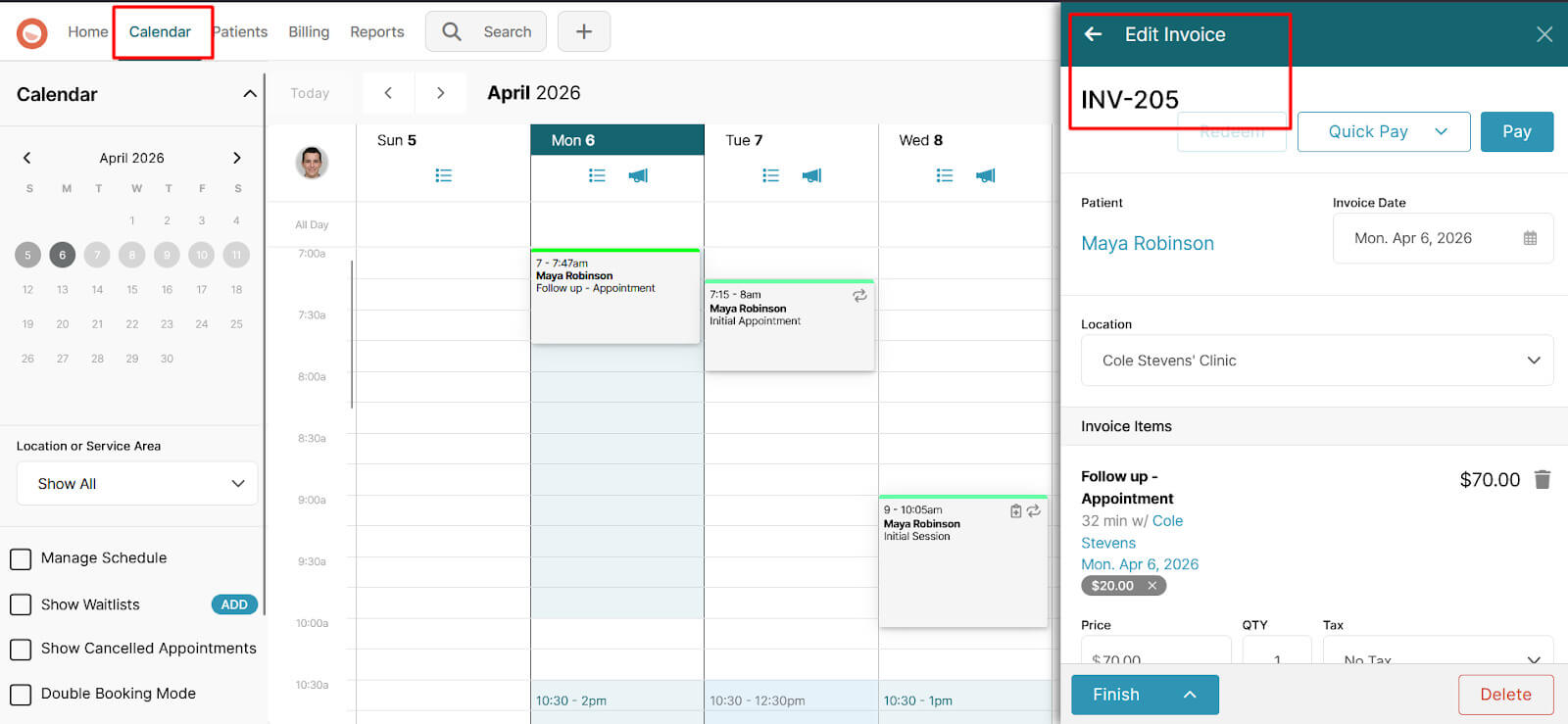
Your clinic does not have to force billing into one fixed process. You can invoice right after the visit, or your staff can handle it later when they review the account.
With Noterro, checkout becomes easier since your staff does not have to re-enter the same card details. The cards are securely stored with trusted payment processors such as Square and Bambora (now acquired by Shift4), then mapped to the patient's profile for billing purposes.
That means your team can complete payments with fewer steps at the front desk. When you process an invoice, staff can quickly use the Store or Map Card option, avoiding the need to re-enter card details. That helps reduce checkout time and gives your patients a smoother payment experience.
The customers I interview often tell me that insurance billing becomes messy long before a claim is submitted.
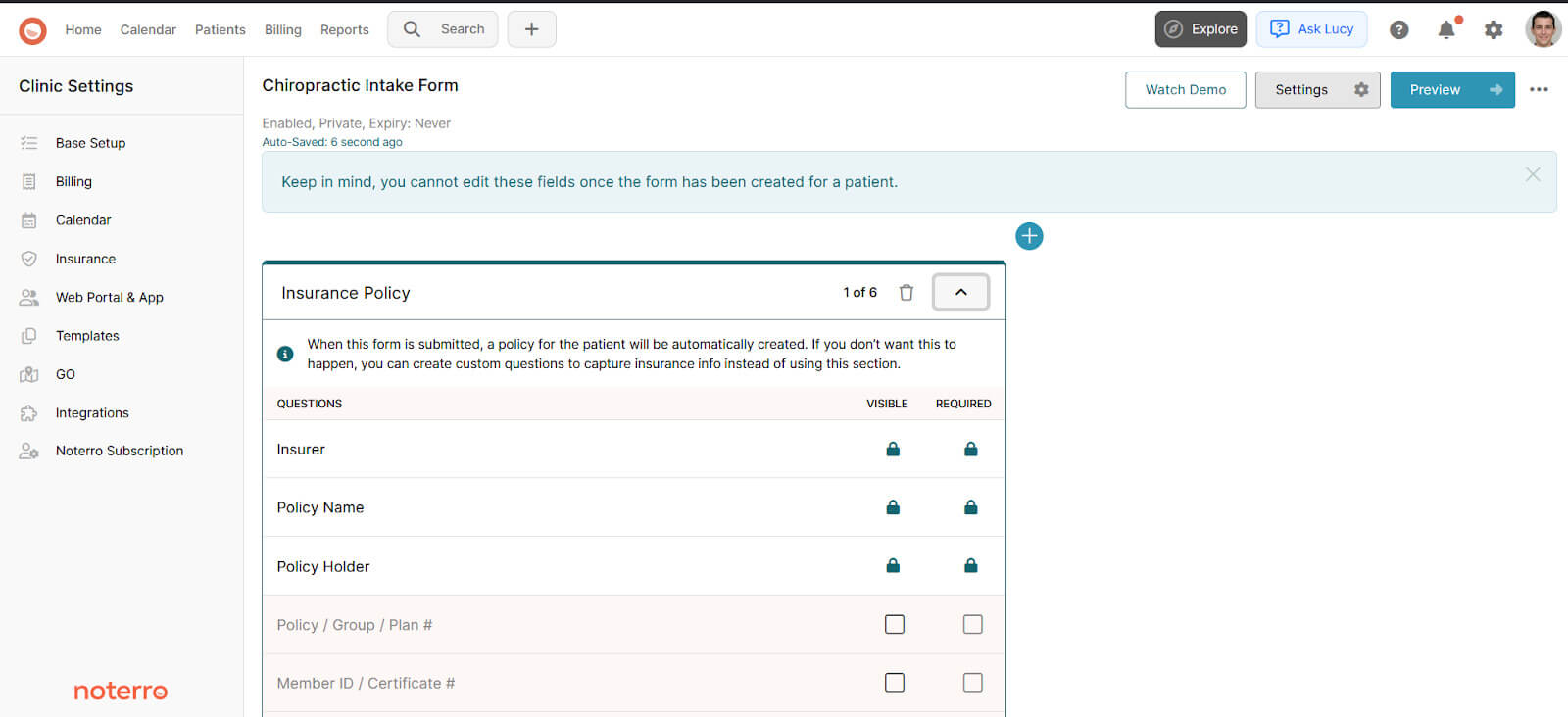
It usually starts when policy details or authorizations are collected too late, and your staff has to fill those gaps. Noterro’s customizable digital intake forms help your clinic collect policy numbers, insurance details, consent agreements, direct billing authorizations, and related documents earlier in the patient journey.
Claim workflows vary by region, so the right billing tool must support multiple paths. In Canada, Noterro supports TELUS eClaims for direct claim submission workflows. In the United States, clinics using Availity can submit claims directly from the invoice inside the supported workflow.
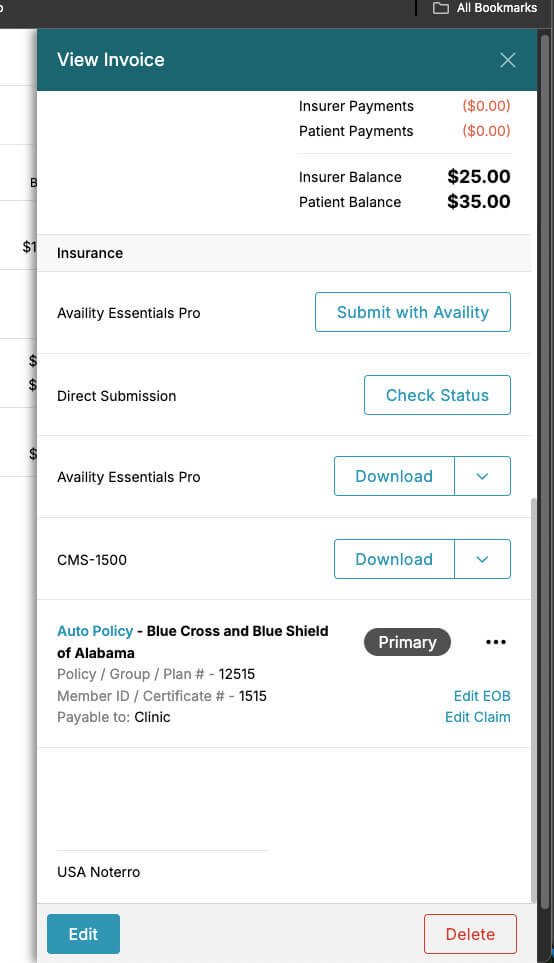
There is also a second route for clinics that prefer or require manual submission to the clearinghouse. If your clinic uses a clearinghouse, Noterro lets you export claims as EDI files and upload them to platforms like Availity, Claim.MD, Office Ally, and TriZetto. You can also group draft claims into batches, which makes claim submission easier when your clinic is handling higher volume.
Some clinics need a way to collect part of the payment before the appointment, while others want more predictable recurring revenue. Noterro supports both. Your clinic can require deposits during online booking, set them by service, and create monthly memberships with automatic payments for services or discounted treatments.
Your front desk has enough to manage without having to remember which patient gets which discount. In Noterro, discounts can be assigned to the patient profile and then applied automatically to invoices. That gives your clinic a more reliable way to handle special pricing without adding manual steps at the billing stage.
Labels can also help your team track those rules more clearly, such as using a “Senior” label for patients connected to a senior discount.
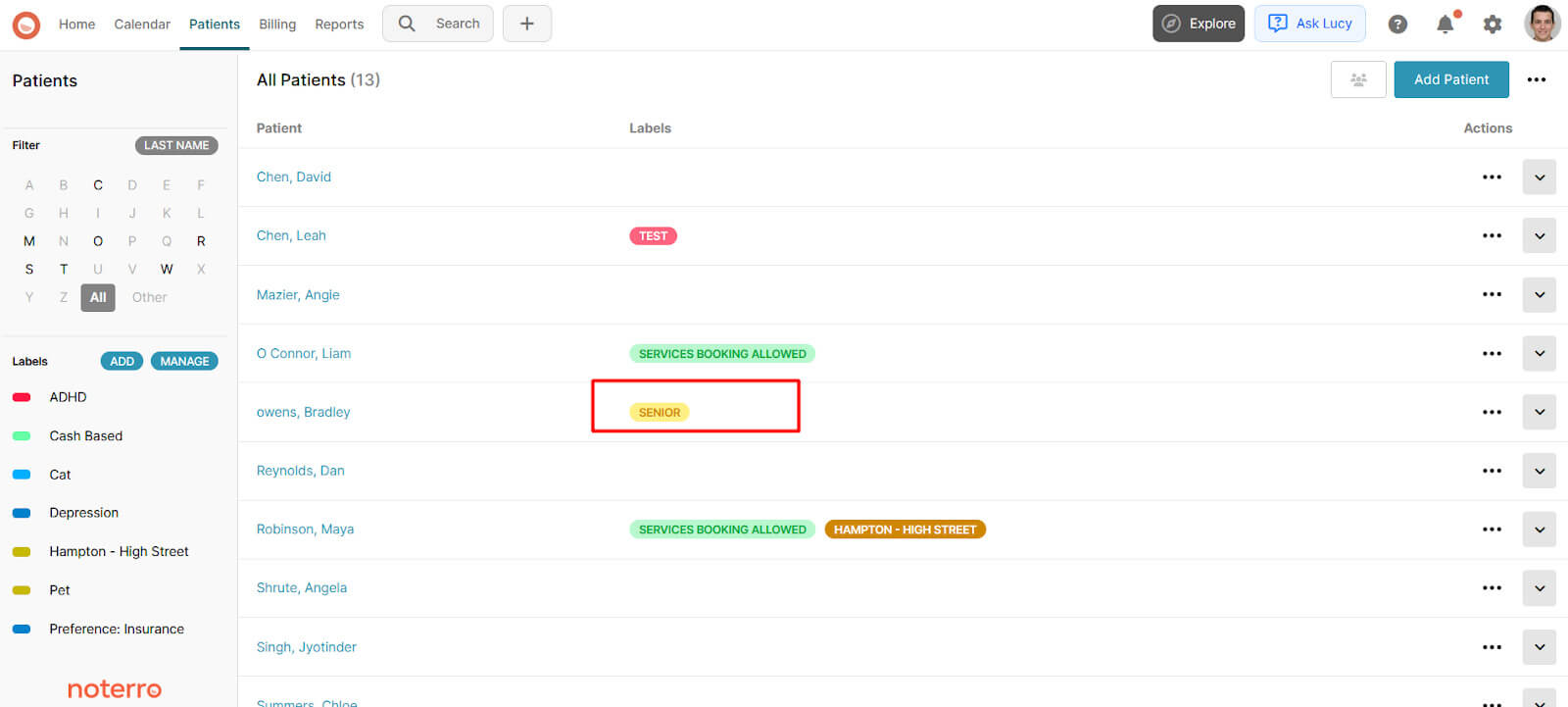
That creates a more reliable billing process because the system enforces the rule consistently, rather than relying on memory.
I know clinic owners do not want to dig through different tools just to understand what is happening with billing.
Noterro gives your clinic a single place to review billing activity, making it easier to see what has been paid, what is still open, and what needs follow-up. This makes the day-to-day review more manageable. You can:
That same visibility carries into reporting as well. Transaction reports and financial reports help you review clinic revenue more clearly. If your accounting is outside Noterro, you can export invoices for upload to QuickBooks or Xero.
Self-service payments matter because every payment the patient handles themselves removes one more admin task from the front desk. Noterro’s clinic-branded web app enables patients to pay invoices, review invoice history, and access receipts without staff assistance.
When patients can handle common payment tasks themselves, staff can spend less time on follow-ups and more time on patient flow, scheduling, and in-clinic communication.
Billing becomes more difficult when too many parts of the process are spread across different systems. That is when your team ends up re-entering information, fixing avoidable issues, and spending more time on admin than they should.
When billing, payments, insurance details, and reporting are handled in one connected workflow, the process becomes easier to manage from start to finish. Your clinic gets fewer gaps, fewer delays, and a clearer view of financial performance.
That is why tools like Noterro can make chiropractic billing feel a lot more manageable day to day.

Tags
Nick Gabriele, Director, Noterro, has been leading the company to greater heights since May 2012. With his vision and 10+ years of expertise, Noterro has become a leading practice management software that offers users an innovative platform for storing notes, tracking appointments, and managing their practice.
Noterro was born out of the need to create a more efficient way to manage paper charts at Ontario College of Health and Technology, which Nick owned.
For nine years, he has performed Independent Medical Evaluations, which allowed him to sharpen his skills in assessing and providing solutions to various health-related issues. With a strong background in rehabilitation settings, including Chiropractic, Physiotherapy, and Massage Therapy, Nick has also garnered a wealth of experience in his field.
Furthermore, Nick has a knack for passion and proficiency in education that has also led him to work in private education for over 20 years. This invaluable experience has enabled him to develop a deeper understanding of how to deliver top-notch training and support to individuals and organizations alike.
In addition to his professional achievements, Nick is an active speaker and has participated in several webinars and podcasts on topics related to electronic record-keeping and practice management. He also has written a plethora of leadership articles on tech topics, including "Charting in the electronic age," "How to Leverage Practice Management Software." His work has been featured in top industry publications, such as Hamilton News. Nick’s insights also have been cited in notable Podcasts like Business Blueprint and Practiciology.
.webp)
No credit card required. Available 1-on-1 support.
.webp)
No credit card required. Available 1-on-1 support.
.webp)
.webp)




.webp)