

11 Massage Therapy Automated Tools To Save Time & Boost Revenue

Running a massage therapy clinic in 2026 means dealing with more moving parts than ever. Last-minute bookings, overdue invoices, and scattered SOAP notes fill your day before your first client walks through the door.
The difference between thriving clinics and struggling ones? The thriving ones automated their admin work.
They're not working harder. They're working smarter. Cancellations fill themselves from waitlists, voice notes become SOAP documentation, and review management is automated.
These clinics save 10-15 hours weekly, not by hiring more staff or by working weekends, but by using the right tools that handle the busywork. So, today, I’ll show you 11 massage therapy automation tools that actually make a difference.
1. All-in-One Clinic Management: Noterro
Every clinic needs a digital command center. One place where scheduling, billing, notes, and insurance billing work in sync. That’s what Noterro offers.
Why Use This Tool
Noterro automates scheduling, documentation, payments, and insurance. It connects everything: calendar to billing, charting to patient history, and reminders to booking preferences.
Waitlist management helps automatically fill cancelled appointments. Someone cancels? You can send notifications to your waitlist, and your schedule stays full. Massage therapists who use Noterro often reclaim hours per week, which can be better spent with clients.
Features
- Scheduling: Online booking, recurring appointments, and automatic appointment confirmations.
- Noterro Scribe: Voice-to-chart AI Scribe that turns spoken words into SOAP notes in real time.
- Predictive Charting: Speeds up documentation with smart suggestions.
- Insurance Integration: Direct billing through TELUS and Availity.
- Automated Reminders: SMS and email to reduce no-shows.
- Client App: Clinic-branded app where clients can book, cancel, and pay.
- Noterro GO: Location-based scheduling for mobile massage therapists, with geo-targeting and travel limits.
- Integrations: Offers integrations with Quickbooks, Xero, Square, Shift4 (formerly Worldline / Bambora), and more.
Noterro simplifies operations into one streamlined system. Once your foundation is solid, you can layer on more tools to power up your clinic.
Related Read: 8 Massage Therapy Business Models: Find the Best Fit for Your Practice
2. Internal Messaging Tools: Slack & Google Chat
When you’re running a busy clinic with multiple practitioners, real-time communication matters. I believe that Slack and Google Chat are the best free/affordable options for keeping conversations organised. No more hallway catch-ups or endless emails. Quick updates, shift changes, and clinic announcements are easier to manage in a centralised chat space. These tools also support file sharing, video calls, and integrations with calendars or project boards.
Slack: Why Use It
Slack puts conversations where they belong. One channel for schedule changes, another for general updates. One for wins and celebrations. Everything's organised and searchable.
Features
- Organised Channels: Create dedicated spaces for different topics. #schedule-changes for shift updates. #supplies when you're out of massage oil. #wins for celebrating success. Conversations stay focused and searchable.
- File Sharing That Works: Drop PDFs, images, or documents into any conversation. Files stay attached to relevant discussions. Search finds anything in seconds. No more "who has the latest version?" emails.
Google Chat: Why Use It
Google Chat makes more sense if you're already using Google Workspace. It's simpler than Slack but does what you need. Jump straight from chatting to video calls when necessary.
Features
- Seamless Google Integration: Jump from Gmail to chat without switching apps. Share Google Docs instantly. Everyone sees updates in real-time. Perfect if you're already in Google Workspace.
- Built-In Video Calls: One click from any chat to Google Meet. No sending links or scheduling. Quick consultations with remote team members happen instantly.
- Alternative: Microsoft Teams if you're using Microsoft 365.
Bonus Read: 12 Struggles Every Massage Therapist Faces (With the Fixes)
3. Payment & Accounting Automation: Square and QuickBooks
You're here to treat clients, not chase invoices. Payment and accounting tools automate your cash flow, track your income, and make tax season manageable.
Square: Why Use It
Excellence in in-person transactions. Free POS app that turns any tablet into a payment terminal. Hardware options like readers and terminals. Integrates with Noterro to streamline payment processing and maintain accurate records.
Features
- Free POS System: Turn any tablet into a payment terminal. Accept tap, chip, or swipe. Tips are added easily. Receipts are emailed or texted automatically.
- Instant Deposits: Get your money next business day standard. Need it faster? Instant deposits available.
- Inventory Tracking: Sell massage oils, foam rollers, or gift certificates. Track stock automatically. Get low inventory alerts. Bundle products with services.
- Integration with Noterro: You can integrate with Noterro, allowing your patients to play directly from your web app online.
QuickBooks: Why Use It
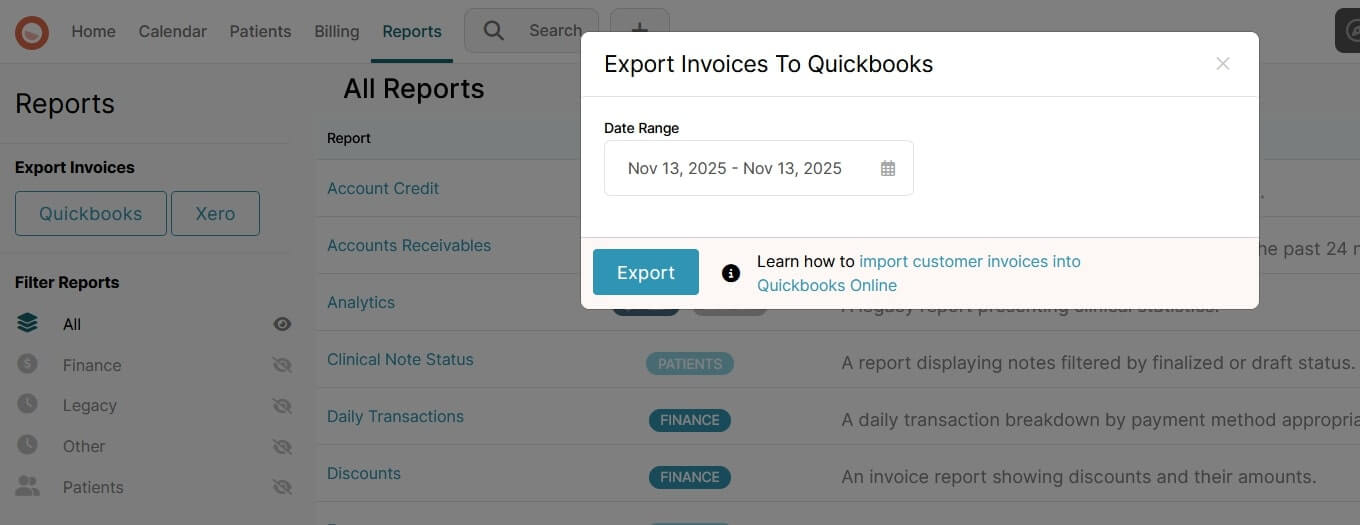
The standard for managing business finances. Tracks every dollar in and out. Generates reports you actually need. Manages sales tax without the headache. Accepts invoice imports straight from Noterro.
Features
- Integration: You can export invoices from Noterro and then import them into QuickBooks or Xero. No double entry.
- Expense Tracking: Snap receipt photos with your phone. QuickBooks reads and records them. Track mileage for mobile therapists. Capture every tax deduction.
- Invoice Management: Import directly from Noterro. Send professional invoices with your logo. Automatic payment reminders for overdue accounts. See who owes what instantly.
- Real-Time Reporting: Profit and loss statements update live. Compare this month to last year. Track which services make money. Make decisions based on data.
- Alternative: Xero is a great alternative to QuickBooks, especially for multi-location or international operations. Real-time data dashboards show you exactly where you stand. Automatic bank feeds keep everything current. Payroll support is built right in.
4.Marketing & Engagement: Canva, Meta Business Suite, Google Ads, Mailchimp
Getting booked solid requires visibility. These tools make it easy to stay in front of clients without spending hours on content creation.
Canva: Why Use It
Build promotional materials, social media graphics, and email headers using pre-built healthcare templates. Canva’s brand kit ensures consistency, and Magic Resize adapts content to any platform.
Features
- Healthcare Templates Library: Thousands of designs for social posts, flyers, business cards, service menus, gift certificates. All created for health businesses. Replace text and go.
- Brand Kit Power: Upload your logo once. Set your colours once. Every design uses them automatically. Consistency without thinking about it.
- Magic Resize: Create one design, get every size needed. Design a Facebook post, instantly get an Instagram story, LinkedIn post, and print flyer. One creation becomes ten assets.
- Team Collaboration: Share designs with your team. Get feedback before posting. Control who can edit. Marketing becomes collaborative, not solo.
Meta Business Suite: Why Use It
Manage and schedule content across Facebook and Instagram. View all messages, comments, and engagement stats from one dashboard.
Features
- Unified Publishing: Create content once, publish to Facebook and Instagram simultaneously. Schedule posts weeks in advance. Choose optimal posting times automatically.
- Comprehensive Analytics: See which posts drive actual bookings. Track follower growth over time. Understand audience demographics. Learn what content works.
- Unified Inbox: All Facebook and Instagram messages in one place. Automated responses for common questions. Save replies for frequent inquiries. Never miss potential clients.
- Ad Management: Create and manage ads directly from the platform. Target local clients precisely. Set budgets you're comfortable with. Track return on spend.
Google Ads Smart Campaigns: Why Use It
Automate paid ad campaigns to attract local clients. Input your services, budget, and area—Google’s AI handles the targeting.
Features
- Location Targeting: Show ads only in your service area. Adjust radius around your clinic. Mobile therapists can target specific neighbourhoods. The budget focuses on real prospects.
- Automatic Optimization: Google's AI tests different ad variations. Learn which messages convert. Adjusts bids throughout the day. Targets devices that book appointments.
- Call Tracking: See which ads generate phone calls. Track call duration and quality. Know your cost per new client. Optimize for bookings, not just clicks.
- Budget Control: Set daily limits you're comfortable with. Pause campaigns instantly. No contracts or minimums. Start small, scale what works.
Mailchimp Automations: Why Use It
Design emails with drag-and-drop tools. Segment your audience by visit frequency or service type. Automate follow-ups, appointment reminders, rebooking prompts, and wellness tips.
Features
- Drag-and-Drop Builder: Create professional emails without coding. Mobile-responsive automatically. Healthcare templates ready to use. Preview before sending.
- Advanced Segmentation: Group clients by visit frequency, target based on services used, separate active from inactive, and more.
- Automation Journeys: Welcome series for new clients runs automatically. Post-appointment emails encourage rebooking. Birthday messages build relationships. Win-back campaigns re-engage lost clients.
- Noterro Integration: Client lists sync automatically. No manual imports. Segment based on real appointment data. Personalization matters.
Here’s how to ace your marketing: Dominate Locally: 15 Local SEO Secrets For Massage Therapists
5. Reputation Management Tools: Google Business Profile & Podium
Reviews drive new bookings. 88% of people trust online reviews like personal recommendations. Without reviews, you're invisible. Automated review tools make it easier to collect and manage them without being pushy. These tools help you build a five-star reputation systematically.
Google Business Profile: Why Use It
This is your digital storefront that determines whether local clients find you. This free tool controls how you appear in search results, maps, and voice searches. Most new clients start their journey here.

Features
- Business Information Management: List your hours, services, and contact details accurately. Add photos of your clinic, team, and treatment rooms. Show parking information and accessibility features. Make it easy for clients to choose you.
- Review Collection and Response: Patients leave reviews directly on your profile. You respond to show you care. Good reviews boost visibility. Even negative reviews become opportunities when handled professionally.
- Google Posts: Share updates, offers, and health tips directly in search results. Announce new services or seasonal specials. Promote last-minute openings. Keep your profile fresh and engaging without touching your website.
- Map Pack Visibility: Your profile determines your position in the "3-pack" of map results. This prime real estate drives the majority of local bookings. Complete profiles with regular activity rank higher.
Podium: Why Use It
Podium understands that people read texts but ignore emails. That's why their text-based approach gets results. Happy clients leave reviews while satisfaction is high. Unhappy ones contact you first, not Google.
Features
- Text-Based Review Requests: 98% open rate compared to 20% for email. Automated invitations after appointments. Happy clients review while satisfaction is high.
- Two-Way Messaging Hub: Handle all client texts from one dashboard. Answer booking questions quickly. Send payment links via text. Everything stays organized by the client.
- Webchat Widget: Add to your website for 24/7 availability. Visitors text without calling. Conversations continue on their phones. Convert browsers into bookers.
- Alternative: Birdeye offers broader review management, survey tools, and competitive benchmarking. Provides sentiment analysis and integrates with scheduling tools for automated outreach.
Also read: 6 Ways Massage Therapy Software Reduces No-Shows & Cancellations
Why Automation Matters in Massage Therapy
Running a massage therapy business involves more than hands-on care. It requires coordination, client follow-up, billing accuracy, and operational consistency. This is where automation comes in.
- Reduces Admin Overload: Automating repetitive tasks like charting, scheduling, and invoicing frees up hours each week.
- Boosts Client Satisfaction: Clients expect modern conveniences—online booking, appointment reminders, and digital receipts.
- Improves Professionalism: Consistent communication, timely responses, and branded touchpoints elevate the client experience.
- Reduces Burnout: Less time managing paperwork and more time focused on delivering care improves therapist well-being.
- Enhances Clinic Efficiency: Automation ensures no tasks fall through the cracks and your schedule is fully optimized.
- Increases Revenue: With fewer no-shows, faster payments, and better client retention, your bottom line benefits.
Automation lets you build a sustainable, modern clinic that supports both your clients and your long-term business goals.
How to Choose the Right Automation Tools for Your Massage Therapy Business
Choosing the right automation tools depends on your clinic’s size, tech comfort level, and growth plans. Here’s what to consider:
- Identify Pain Points First: Start by asking where you lose the most time—such as manual booking? Chasing payments? Then find tools that solve those specific issues.
- Prioritize Integration: Tools that connect seamlessly with each other (especially with your practice management system like Noterro) reduce double-entry and errors.
- Check Mobile Access: Look for cloud-based tools or mobile apps that allow you to access your schedule, client notes, and billing on the go.
- Think About Scalability: Will the tool still work if you add staff or locations? Choose platforms that can grow with you.
- Evaluate Cost vs. Value: A $30/month tool that saves 5 hours a week pays for itself many times over.
- Test the Support: Ensure each tool offers reliable customer support, onboarding help, and clear documentation.
For solo therapists, an all-in-one system like Noterro is often the easiest starting point. For growing clinics, layering tools like Mailchimp, QuickBooks, or Podium on top of a core system keeps operations lean without sacrificing capability.
Final Thoughts
Automation doesn't replace your personal touch. It gives you time to use it.
The right automation tools handle the repetitive tasks that drain your energy, freeing you to focus on what you do best: helping clients feel better. Every hour saved on administrative work is an hour you can invest in growing your practice or enjoying a life outside of it.
The best therapists aren't necessarily the ones with the best hands. They're the ones with the best systems.
Try Noterro free for 14 days. No credit card required. See why thousands of practices started here.
Share





.webp)
.webp)
.webp)