No items found.
Free Webinar · May 7 · How to Get (and Keep) More Patients as a Practitioner →
Save Your Spot


Table of Contents

Experience Better Practice Management Today!
Starting at $28.05/month
No Credit Card Required
Experience Better Practice Management Today!
Starting at $30/month
No Credit Card Required
Running a clinic isn’t just about patient care. I’ve seen clinics where staff provide excellent care but still spend hours on paperwork, billing, and scheduling.
According to The Harris Poll, clinicians spend 28 hours a week on administrative tasks, medical office staff 34 hours, and claims personnel 36 hours. With so much time lost, focusing on patients becomes a challenge.
The right clinic management software can reduce errors, save time, and keep your clinic running efficiently.
In this guide, I’ll help you:
By the end, you’ll know how to pick software that keeps your clinic running smoothly and focused on patient care.
Picking the right clinic management software doesn’t have to be overwhelming. With a few clear steps, it gets much easier. The key is understanding what your clinic actually needs and testing options carefully before you decide.
Many clinics spend a big chunk of time on admin work like scheduling, billing, and documentation, often around 30–40%, which reduces time for patient care. The right software can ease that burden. Here’s a step-by-step guide:
Every clinic works in its own way. Start by looking at your daily challenges and what you might need in the future.
Read in Detail: Top Features of Practice Management Software for Sustainable Growth
Don’t just go with the first option you see. I always encourage clinics to read what other users say before deciding on software, because reviews reflect real experiences, not just marketing claims. Look at review sites like G2, Capterra, and Software Advice. These platforms share detailed user feedback and side-by-side feature comparisons.
What to Look For and Where to Check:
Try to shortlist 2 or 3 options that seem like the best fit. This makes comparison easier.
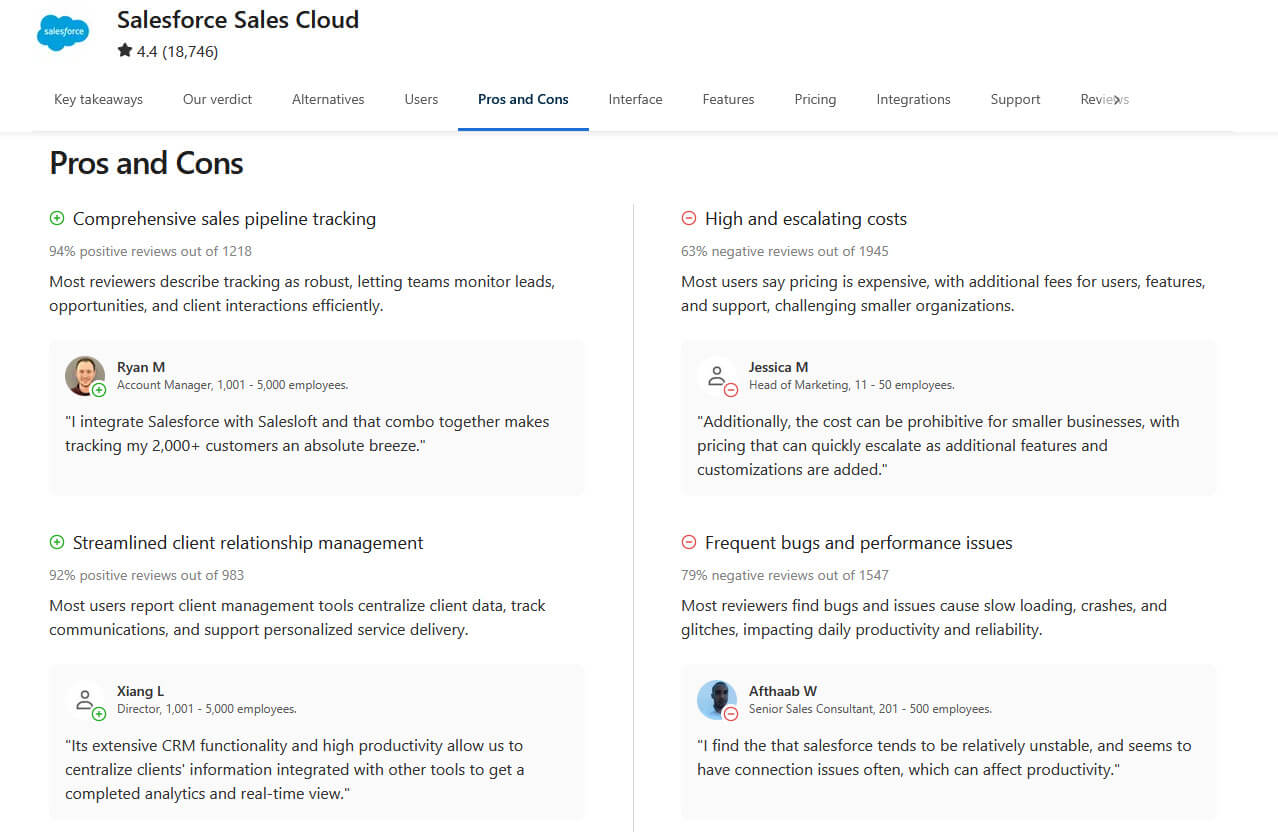
Once you have a shortlist, dig into what each software actually offers.
Bonus Read: The Impact of Appointment Reminder Software to Boost Patient Engagement
Patient data safety is not optional; it’s critical. A single breach can harm your patients and put your clinic at legal risk. The right software keeps sensitive information protected and ensures you follow the law. You should ask these questions:
Example Scenario: Suppose your clinic operates in multiple states with varying data protection laws. Choosing software that supports multi-region compliance ensures you stay protected.
Bonus Read: How to Switch Clinic Management Software Without Losing Patient Data
Clinic management software shouldn’t stop at booking appointments. In day-to-day clinic life, clinical work and billing are closely connected, and when the software treats them as separate systems, problems show up fast. I’ve seen clinics spend hours correcting small errors simply because information didn’t carry over properly.
What to Check:
When clinical documentation and billing work side by side, clinics spend less time on paperwork and more time doing what actually matterstaking care of patients.
Cost isn’t just the price tag. A cheaper option might save money upfront,t but cost time later. I always tell clinics to think about how much time the software can save. However, the focus should also be on the return on investment
Noterro offers an even more effective approach with tiered pricing. Each tier is designed around a clear stage of clinic growth, so you can choose the plan that fits your clinic today and upgrade as your needs evolve. This makes it simple to scale without unexpected costs.

I never recommend buying software without trying it. Free trials or demos show if it really fits your clinic. Noterro offers a 14-day free trial and a free demo so you can explore the features before committing. You can sign up at Noterro's signup guide to get started with your trial.
Look for answers to these questions during the trial:
Include your staff in testing. Receptionists, nurses, and doctors may all have different needs. Getting their feedback makes sure the software works for the whole team.
Helpful Read: How a Clinic Management Software Can define the success of your clinic
Even reliable software can run into issues at times. When that happens, quick and dependable support makes a big difference. Noterro supports clinics with hands-on assistance and a rich knowledge base through its Help Center, making it easier to resolve questions and issues efficiently. Clinics often lose valuable hours when help is slow or hard to reach.
Also Read: What Is Medical Charting Software and Why Is It Important?
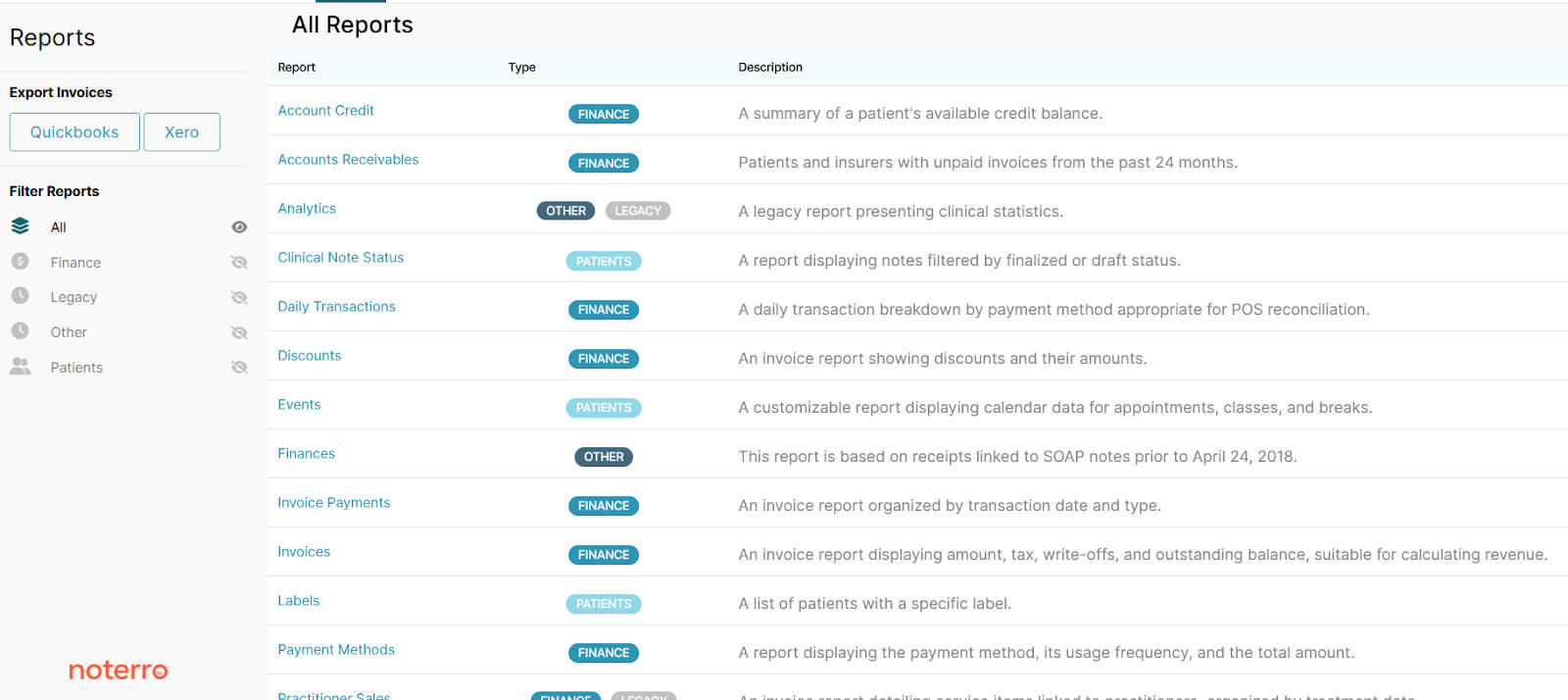
Data and analytics can tell you what’s working and what needs attention in your clinic. Noterro offers multiple types of reports, including appointment, financial, sales, practitioner, and patient reports, to support this.
For example:
The right reports let you make decisions quickly instead of guessing. It also helps you spot problems before they affect patients.
Helpful Read: Top Practice Management Software of 2024 to Improve Clinic Performance
Picking the wrong clinic software can create delays, increase stress, and even risk patient data. Many clinics choose based on price or feature lists alone and regret it later. Knowing what to watch out for helps you make a smart, long-term decision for your team and patients.
Your team uses the software every day, so their input is crucial. Without it, you risk buying a tool that slows workflow.
Cheap software can be appealing, but it often misses key functions or support. Look at the full value, not just the price tag.
Bonus Read: How to Start a Mobile Health Clinic in 2025: A Step-by-Step Guide
Keeping patient data safe is not optional. Weak protection can lead to breaches and compliance issues.
Software that doesn’t connect with your other systems adds extra work and errors.
As your clinic grows, your software should grow too. A small system now may struggle later.
Not testing software before buying leads to surprises and operational problems.
Even the best software can have problems. Reliable support keeps your clinic running smoothly.
Also Read: Avoid These 12 Mistakes: Proven Strategies to Grow Your Medical Practice
Buying software too quickly can cost time and money. Take the process slowly and involve your team.
Choosing the right clinic management software affects your daily operations. It reduces administrative work, improves patient care, and keeps your clinic organized.
Define your needs, compare options, and test before deciding. The right software helps your clinic run smoothly and saves you time.
Ready to make the shift? Tools like Noterro can help you reclaim your time, simplify workflows, and refocus on what matters most: your patients. The first step is yours to take; start today!

Tags
Ryan Barichello, Co-Founder of Noterro, is a dynamic leader with a vision for innovation and excellence in the tech industry. With both a Business and Computer Science diploma from Mohawk College, Ryan has honed his business and software development expertise.
His leadership and dedication have garnered him several prestigious awards, including the 2018 Fast 40 Hamilton issued by Hamilton Economic Development. He also received the 2015 Outstanding Small Business of the Year from the Stoney Creek Chamber of Commerce and the 2013 Hamilton Top 40 Under 40 from Business Link Media.
Beyond his professional achievements, Ryan is deeply involved in community initiatives. As a board member of Festitalia for 9 years, he actively promoted Italian culture and heritage in the community. He also has spent time volunteering as a mentor in Greater Hamilton Teaching Youth Entrepreneur Program (M.I.G.H.T.Y), nurturing the next generation of leaders.
With a keen eye for detail and a disciplined approach, Ryan tackles challenges with precision, ensuring that every project he undertakes is a resounding success. Ryan's strategic mindset and passion for entrepreneurship have been instrumental in propelling Noterro to the forefront of the industry.
Driven by a relentless pursuit of excellence, Ryan is passionate about technological innovation. His expertise in addressing complex challenges with precision, alongside his dedication to innovation, sets him apart as a leader in the technology field.


.webp)
No credit card required. Available 1-on-1 support.
.webp)
No credit card required. Available 1-on-1 support.
.webp)
.webp)



.webp)