No items found.
Free Webinar · May 7 · How to Get (and Keep) More Patients as a Practitioner →
Save Your Spot


Table of Contents

Experience Better Practice Management Today!
Starting at $28.05/month
No Credit Card Required
Experience Better Practice Management Today!
Starting at $30/month
No Credit Card Required
How many osteopathy clinics feel busy but still wonder where the margin goes? More than most owners admit.
You can be fully booked and still feel stretched. Revenue looks steady, yet the workload feels heavier as the clinic grows.
That pressure usually isn’t clinical. It’s administrative, and it builds through small repetitive tasks that rarely get measured.
In this article, I’ll break down:
Let’s look at where the money really goes.
This is not about solutions yet. I want to show you where money leaks, even when your clinic feels stable.
If you run a solo, small, or growing clinic, you might feel busy but profitable. The numbers may appear fine on the surface, but pressure builds underneath.
Manual staff scheduling feels manageable when you operate alone because changes stay contained and predictable. Once you add another practitioner, coordination expands faster than most owners expect.
Let me give you a fictional example that mirrors real conversations. I will call her Alina. She runs a small clinic and works mobile days twice a week. After hiring a second practitioner, she expected relief but found herself spending more time adjusting calendars, confirming changes, and managing ripple effects across the week.
The issue was not major disruptions but steady, small shifts that repeated daily. As those small adjustments multiplied, scheduling quietly became a consistent admin cost center.
A front desk can look busy and still be stuck. Busy does not always mean productive. Sometimes it just means interrupted. A clinic owner once described their day like this, and it stuck with me:
“It’s like we’re doing ten-second tasks all day and none of them finish the work.”
Calls interrupted bookings, bookings interrupted billing, and messages competed for attention throughout the afternoon. Even capable admin staff struggled because constant context switching drained focus and extended simple tasks into longer ones.
When clinics request two-way messaging, they often want fewer calls, but the deeper goal is to reduce manual touchpoints per appointment.
When the clinic feels full, follow-through weakens first because urgent tasks consistently take priority. The team remains active, yet planned outreach slowly slips down the list.
A follow-up gets postponed to tomorrow, and tomorrow fills with new changes. A week passes before anyone revisits it, and the patient never rebooks. That empty slot doesn't feel dramatic, but repeated gaps reflect a process that failed to build momentum early. Over time, recovery work replaces consistent scheduling flow.
One practical way to understand hidden costs is tracking admin time per patient as your clinic grows.
Scale should reduce coordination per visit, yet manual systems often expand that workload instead. Because manual steps repeat across appointments:
None of these tasks feels huge on its own, but they repeat hundreds of times. Small inefficiencies compound with volume, and clinics feel busier without proportional gains. This is where administrative ROI becomes real. You are spending more time to get the same outcome.
Most clinics track payroll carefully, yet fewer measure interruptions, overtime, and burnout patterns that quietly increase cost. These expenses rarely show up clearly in financial summaries.
If an admin lead stays 30 minutes late three days each week, that adds up to roughly 6 extra hours per month and more than 70 hours per year. It feels minor in isolation, but over time, it becomes structural overhead. Add turnover risk and training time, and system strain begins driving hiring decisions.
When someone tells me their clinic is busy, I do not immediately assume that progress is being made. Activity can rise without stronger coordination or better systems.
Cost pressure usually appears later, after inefficiencies have settled into routine operations. Without visibility into patterns, decisions rely on instinct rather than measurable insight. Instinct often pushes hiring first, even when process adjustments would reduce strain more effectively.
Also read: What to Look For in Osteopathy Software That Improves Patient Experience
Now we can talk about what changes the game. The clinics that save costs long-term don’t automate just one task; they automate the flow.
They reduce the number of manual touchpoints per appointment. They stop chasing people for routine steps. They stop relying on memory for follow-through. Here’s how that looks in practice.
Front-desk strain usually shows up first because that is where every workflow intersects. Booking, rescheduling, confirmations, cancellations, and follow-ups all pass through that one point.
When booking moves online, a large portion of back-and-forth disappears immediately. Noterro, an osteopathy management software, supports online booking through your clinic-branded app, which allows patients to confirm, reschedule, and receive reminders without staff involvement.
Instead of multiple call loops and manual confirmations, the system handles:
In smaller clinics with two practitioners, one late patient or last-minute cancellation can derail the entire afternoon.
When automated reminders, waitlists, and arrival tracking operate together, those disruptions stop spreading. The schedule absorbs small changes instead of collapsing around them. That is where cost control starts. Not from adding features, but from removing firefighting.
Related read: 10 Best Osteopathy Practice Management Software for 2026
Intake is one of the quietest time drains inside a clinic. Paper forms slow check-in, emailed PDFs create confusion, and last-minute completion leads to rushed or incomplete data.
The real issue is timing. When information enters the system at the wrong moment, pressure shifts to the front desk and into the first minutes of the appointment. Clinical preparation competes with intake cleanup.
When intake forms and agreements are sent automatically after booking and completed before arrival, that pressure disappears. Noterro supports digital intake forms and signature-based agreements, which allows missing fields to be flagged early and consent captured in advance.
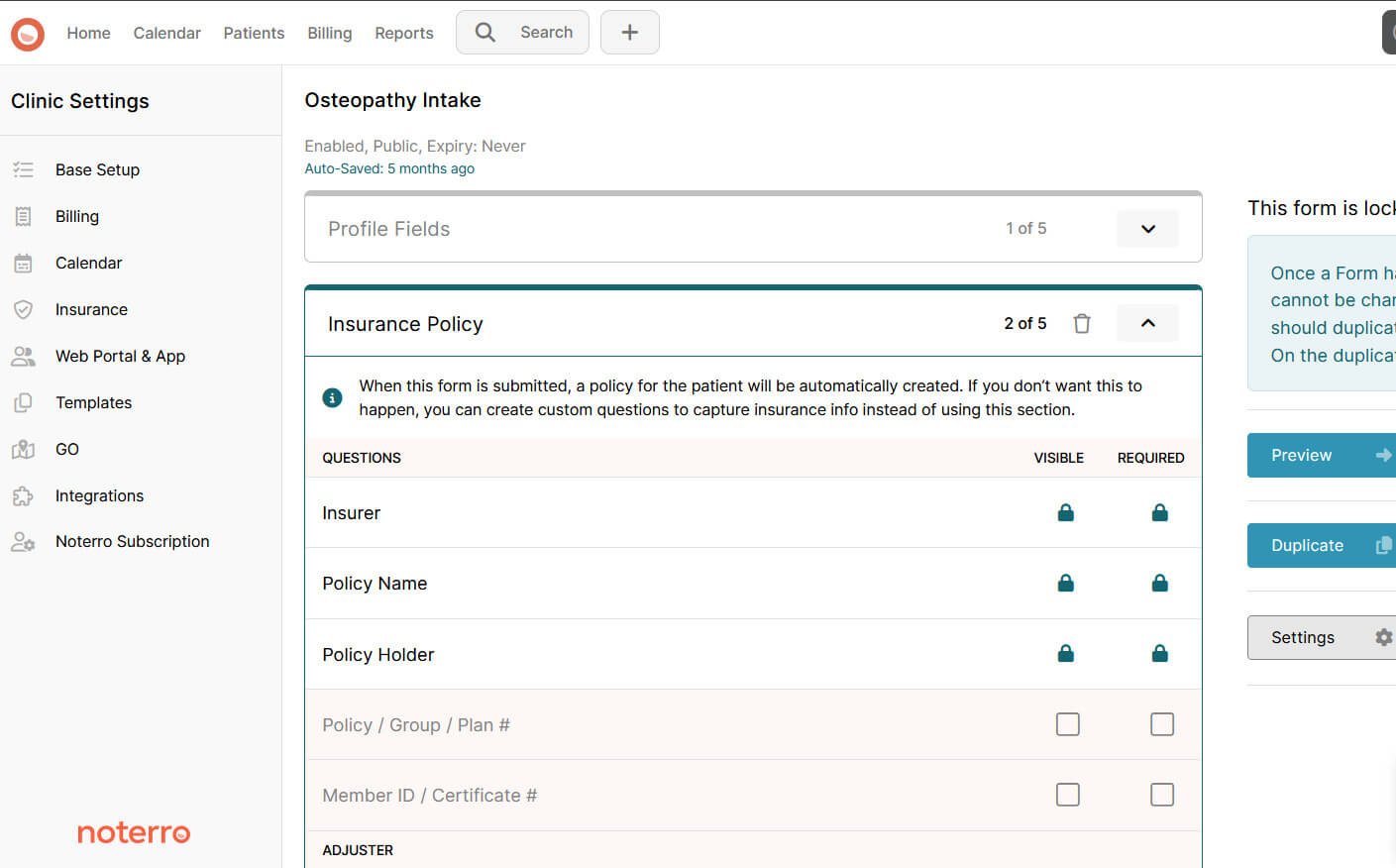
The appointment starts on time. The practitioner prepares clinically instead of administratively. That control protects both schedule stability and patient experience.
Owners often hesitate when scheduling automation comes up. They worry it reduces visibility or control.
In practice, the opposite happens. You get centralized visibility of staff availability, fewer conflicts, and less manual schedule cleanup.
Noterro supports staff management across practitioners and locations. That matters for hybrid clinics and growing teams where availability shifts frequently.
Instead of reacting to conflicts, you plan around them. Availability updates reflect immediately across booking views. Manual cleanup reduces because the system enforces structure.
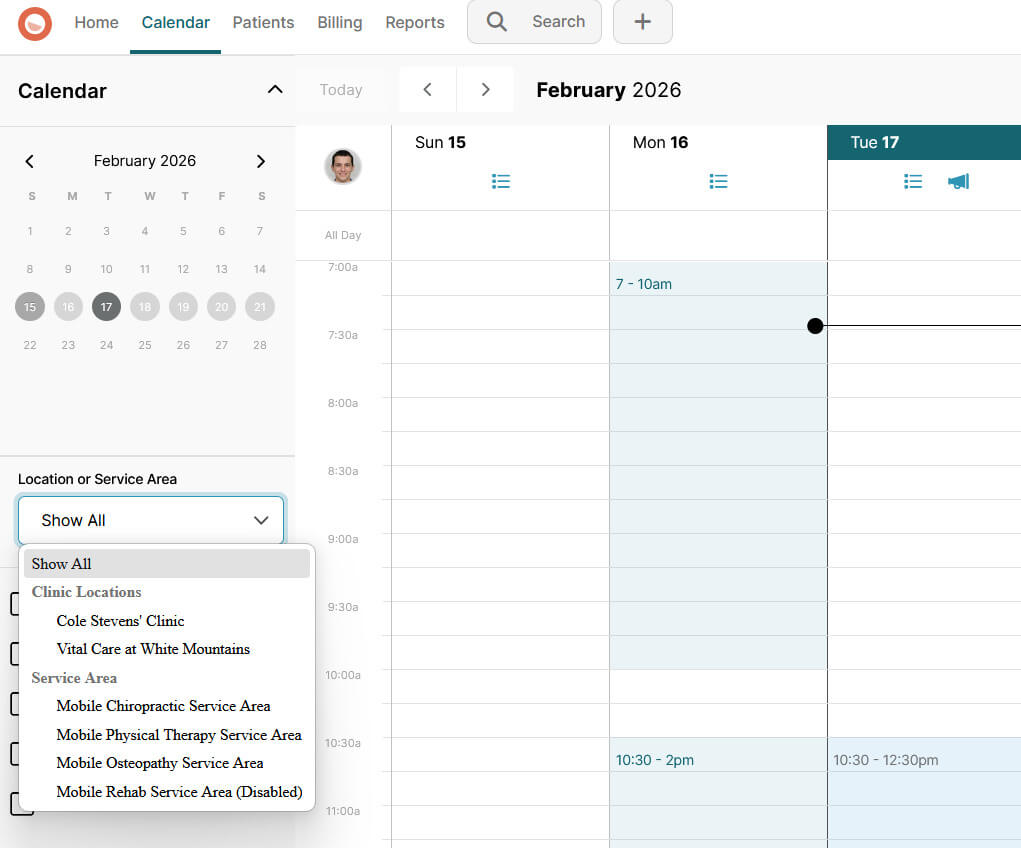
Small clinic owners and clinic admins usually feel this shift first. Time moves from coordination toward planning. Planning lowers cost. Constant coordination raises it.
Charting is not the problem. The timing of it is.
Most notes are completed at the end of the day, when you are already drained. That is when small delays turn into unfinished charts and mental backlog.
What makes the difference is reducing the gap between treatment and documentation. When notes are captured during or right after a session, details stay accurate and consistent. In clinics with multiple practitioners, that structure matters because others rely on those notes.
Noterro includes structured SOAP notes and Scribe for voice-to-chart documentation. You speak, the note forms, and you are not chasing memory later. That protects your time in a very practical way.
Reminders and recall systems often get treated like small add-ons. They don’t feel strategic, so they get less attention.
But when reminders run automatically, fewer appointments slip through. You stop spending parts of your day rebuilding the schedule after a no-show or a forgotten visit. That recovery work is what quietly drains admin time.
The same applies to follow-up notifications. When outreach depends on memory, it becomes inconsistent. When it runs inside your practice system, communication stays steady without adding manual effort.
That is where tools like Noterro fit in. Automated email, SMS, and call reminders work in the background, and engagement metrics start telling you something useful.
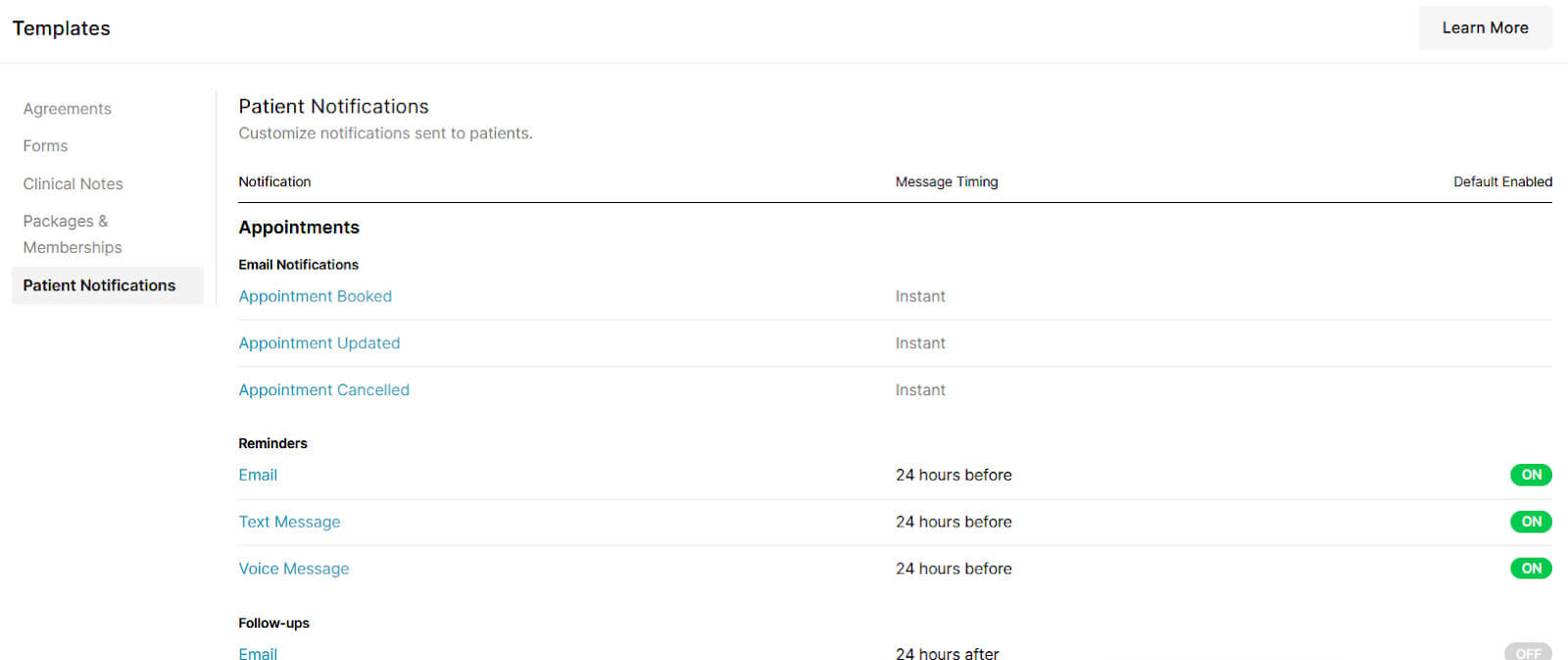
Attendance rates and follow-through patterns become operational signals instead of guesses. When those numbers dip, you see friction early. And early visibility is what protects revenue.
Eventually, the workflow conversation turns into a margin conversation. Admin load shows up in the cost structure whether it is measured or not.
A few grounded calculations usually bring clarity quickly.
You can automate a lot and still feel busy if you start in the wrong place. The priority should match your clinic’s structure and pressure points.
| Clinic Type | Where to Start | Why It Matters |
|---|---|---|
| Solo and Mobile Practitioners |
Online booking through your clinic-branded app SMS and email reminders Intake forms sent ahead of time |
Travel compresses your schedule. Every interruption costs time. Reducing booking calls and last-minute intake protects your treatment hours. |
| Small Clinics (2–5 Practitioners) |
Online booking and automated reminders Waitlists to fill cancellations Intake forms and digital agreements completed before arrival |
Front-desk pressure shows up quickly. Automation reduces phone dependency, smooths check-in, and prevents small gaps from spreading across the day. |
| Medium and Larger Clinics |
Staff management across practitioners and locations Reporting and analytics to spot bottlenecks Structured SOAP notes and voice-to-chart documentation |
As teams grow, coordination and visibility matter more than single tasks. Consistency, reporting, and documentation control prevent scaling chaos. |
Start with the area that removes the most daily friction. Expand your automation as growth creates new coordination pressure.
Automation should change how the clinic operates day-to-day. The real question is whether you know it is actually improving efficiency rather than just adding software.
You can feel when a clinic runs more smoothly. The problem is proving it. You don’t need complex dashboards but a few practical signals to tell the story.
Another sign is how much time goes into “saving” the week. If Friday afternoons feel calmer and less reactive, something is working. This is where efficiency analytics earns its place. It makes bottlenecks visible so you are not relying on instinct alone.
Engagement gets labeled as marketing, but most of it reflects operations. When reminders run consistently, attendance usually improves. When intake is completed before visits, check-in feels lighter. When follow-through is structured, return visits stop depending on memory. The numbers to watch are simple:
If those improve, your admin system is healthier. When reporting makes that visible, you stop guessing and start adjusting early.
I’ve seen clinics add automation and still feel just as busy six months later. The issue usually isn’t effort. It’s where that effort goes.
This one shows up a lot. A booking tool here, a reminder tool there, something else for intake. Each tool works on its own. The problem is the handoff. Someone ends up moving information between systems, double-checking entries, or fixing sync errors. The manual transfer becomes the new admin layer.
There’s a belief that more reminders equal better attendance. What actually happens is patients start tuning them out. Clear, well-timed communication works. Constant pings don’t.
If the system doesn’t match how your clinic runs day to day, the team creates workarounds. Those workarounds slowly turn into the real process. And that’s when admin load creeps back in.
Your front desk knows exactly where time disappears. If they’re not part of the setup conversation, friction shows up after launch. Adoption drops. Old habits return.
Automation only works when it removes repeat steps. If it adds coordination, it’s just a different kind of busy.
Admin should make your day easier, especially as the clinic gets busier. If you notice more time going into booking calls, reminder follow-ups, and fixing small schedule issues, that usually means the system is carrying too much manual work.
The simplest next step is not a big overhaul. Pick one area that repeats every day and tighten it up properly. Then track admin time per patient for a few weeks and see what actually shifts in your schedule. You will usually feel the difference before you even see it in a report.
When booking, intake, reminders, documentation, and reporting sit inside one connected flow, the clinic stops feeling scattered. That is where something like Noterro fits naturally without forcing change.
As patient numbers increase, the clinic should feel steadier, not heavier. If it feels heavier, that is your signal to adjust.

Tags
Nick Gabriele, Director, Noterro, has been leading the company to greater heights since May 2012. With his vision and 10+ years of expertise, Noterro has become a leading practice management software that offers users an innovative platform for storing notes, tracking appointments, and managing their practice.
Noterro was born out of the need to create a more efficient way to manage paper charts at Ontario College of Health and Technology, which Nick owned.
For nine years, he has performed Independent Medical Evaluations, which allowed him to sharpen his skills in assessing and providing solutions to various health-related issues. With a strong background in rehabilitation settings, including Chiropractic, Physiotherapy, and Massage Therapy, Nick has also garnered a wealth of experience in his field.
Furthermore, Nick has a knack for passion and proficiency in education that has also led him to work in private education for over 20 years. This invaluable experience has enabled him to develop a deeper understanding of how to deliver top-notch training and support to individuals and organizations alike.
In addition to his professional achievements, Nick is an active speaker and has participated in several webinars and podcasts on topics related to electronic record-keeping and practice management. He also has written a plethora of leadership articles on tech topics, including "Charting in the electronic age," "How to Leverage Practice Management Software." His work has been featured in top industry publications, such as Hamilton News. Nick’s insights also have been cited in notable Podcasts like Business Blueprint and Practiciology.
.webp)
No credit card required. Available 1-on-1 support.
.webp)



.webp)