No items found.
Free Webinar · May 7 · How to Get (and Keep) More Patients as a Practitioner →
Save Your Spot


Table of Contents

Experience Better Practice Management Today!
Starting at $28.05/month
No Credit Card Required
Experience Better Practice Management Today!
Starting at $30/month
No Credit Card Required
A lot of clinic admin work starts after the appointment ends. I have seen this across clinics for years. The visit may be done, but the work keeps going through aftercare messages, repeat questions, and follow-ups.
That support matters, but it also pulls staff into small tasks that keep repeating all day. Across a busy schedule, that extra admin work starts slowing everything else down.
That pressure adds up fast. One AMA-cited study found that the median total EHR time per visit ranged from 23.5 to 47.9 minutes across clinics.
Here is what I want to help you see in this article:
From what I have seen, follow-up communication is still handled manually in many clinics. Staff end up sending individual aftercare messages, repeating the same instructions for different services, and answering post-visit questions that clearer communication could have avoided.
A lot of that work depends on memory, habit, or whatever time is left in the day. Once the schedule gets busy, follow-ups can become delayed or inconsistent, and those small tasks start taking time away from booking, billing, and front-desk support.
That is where automated follow-up notifications help. Clinics can set up those messages in advance instead of having staff send them one by one, reducing manual work and making communication easier to maintain consistency.
Helpful read: How to Control Access at Every Level: From Roles to Locations
The time savings usually show up in a few practical places during the day. Here is where automated follow-ups make the biggest difference.
Clinic teams often send the same post-visit messages throughout the day. That includes aftercare notes, check-in messages, next-step instructions, and reminders related to what the patient should do after treatment.
The task may seem minor each time, but it builds quickly on a busy day. When staff keep writing or copying the same message across multiple appointments, that repetitive work starts taking time away from other responsibilities.
This is where Noterro, a clinic management software, starts taking real work off your team. It can automatically send follow-up messages after completed appointments, so staff do not have to handle each one manually.

Once those routine follow-up notifications become part of the workflow, the clinic spends less time on repetitive messaging while patients still get the support they need.
Also read: 10 Best Patient Management Software For Small Clinics
Many patient questions after the visit stem from missing or delayed follow-up communication. When people do not receive clear instructions, they often call or message the clinic to ask what to do next.
That back-and-forth creates extra admin work that keeps landing on the front desk. This is where Noterro helps in a practical way.
Clinics can include service-specific follow-up instructions in their automated notifications, so patients get clearer guidance after the appointment. When the message feels relevant to the service they received, there is usually less need for routine follow-up questions.
Consistency is hard to maintain when follow-ups depend on whoever is available at the time. That is when messages get delayed, missed, or handled differently across the clinic.
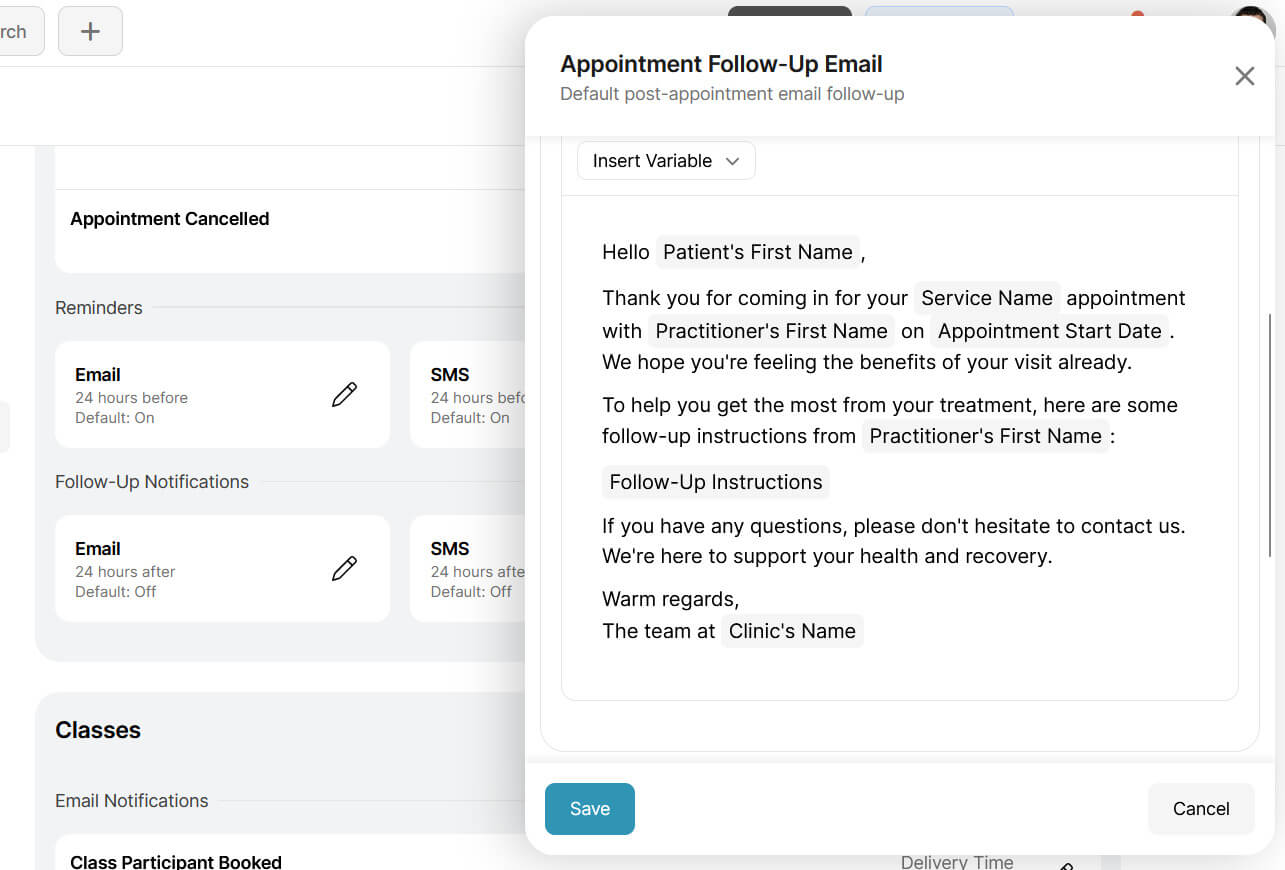
Noterro helps clinics standardize post-appointment communication through follow-up notification templates. That makes it easier for patients to receive timely follow-ups more consistently, without staff having to remember each step themselves.
Different services often need different aftercare. A massage visit, physio session, chiro adjustment, or mobile treatment may all need different wording, timing, or preparation notes.
Without a better system, the staff ends up rewriting or adjusting follow-ups for each treatment type. It adds more admin work and makes the process harder to keep uniform.
Noterro helps reduce that extra effort through follow-up notification templates. Clinics can use those templates with dynamic variables to make follow-ups more relevant for each service, without having to rewrite every message from scratch.
Clinic teams already spend enough time on scheduling, billing, patient support, and front-desk coordination. Routine follow-up messaging should not continue to take time away from those responsibilities.
When follow-ups are automated, staff can stay focused on work that requires decision-making, judgment, and personal interaction rather than handling repeat messages throughout the day.
Bonus read: How to Grow a Practice When You’re Not a Natural Networker
Saving time matters, but generic messages only go so far. Patients need guidance that feels connected to the visit they actually had, not a message that sounds too broad to be useful.
That matters even more in multi-disciplinary clinics and hybrid practice management setups where different treatments lead to different next steps. If the follow-up feels disconnected from the appointment, the patient may still call the clinic for clarity.
I usually tell clinic owners to think about personalization as a way to reduce repeat work, not add more of it. The more relevant the message feels, the fewer loose ends your team needs to tie up later.
That is where Noterro helps make personalization easier to manage. It supports dynamic variables for client details, appointment type, and information, and service-specific instructions in email notifications, so clinics can send follow-ups that feel more relevant without adding more manual work.

Related Read: How to Personalize Automated Reminders to Reduce No-Shows
Timing still matters with follow-up communication. Clinics need a simple way to control when those messages go out, and they may also want to use different channels depending on the message and patient preference.
With Noterro, clinics can choose when follow-up notifications are sent within their overall notification settings. It does not support setting different send times for each follow-up based on the treatment or recovery window.
Clinics can also send follow-ups by email, SMS, or phone, giving them more flexibility without creating additional manual work for staff.
Automated follow-ups are not equally important for every clinic. The value tends to be higher in setups where follow-up communication is a bigger part of the day-to-day workload.
They are often most useful for:
You might also like: How to Switch Clinic Management Software Without Losing Patient Data
Follow-up communication still matters after the appointment, but it should not keep adding routine work to the day. When clinics handle that process more effectively, staff have more time to focus on patients, scheduling, and the work that requires direct attention.
Noterro gives clinics a simpler way to manage follow-ups through editable templates, treatment follow-up emails, and service-specific instructions. It also lets clinics add patient details into messages using variables, which helps make those messages feel more personal and relevant.

Tags
Nick Gabriele, Director, Noterro, has been leading the company to greater heights since May 2012. With his vision and 10+ years of expertise, Noterro has become a leading practice management software that offers users an innovative platform for storing notes, tracking appointments, and managing their practice.
Noterro was born out of the need to create a more efficient way to manage paper charts at Ontario College of Health and Technology, which Nick owned.
For nine years, he has performed Independent Medical Evaluations, which allowed him to sharpen his skills in assessing and providing solutions to various health-related issues. With a strong background in rehabilitation settings, including Chiropractic, Physiotherapy, and Massage Therapy, Nick has also garnered a wealth of experience in his field.
Furthermore, Nick has a knack for passion and proficiency in education that has also led him to work in private education for over 20 years. This invaluable experience has enabled him to develop a deeper understanding of how to deliver top-notch training and support to individuals and organizations alike.
In addition to his professional achievements, Nick is an active speaker and has participated in several webinars and podcasts on topics related to electronic record-keeping and practice management. He also has written a plethora of leadership articles on tech topics, including "Charting in the electronic age," "How to Leverage Practice Management Software." His work has been featured in top industry publications, such as Hamilton News. Nick’s insights also have been cited in notable Podcasts like Business Blueprint and Practiciology.


.webp)
No credit card required. Available 1-on-1 support.
.webp)
No credit card required. Available 1-on-1 support.
.webp)
.webp)



.webp)