No items found.
Free Webinar · May 7 · How to Get (and Keep) More Patients as a Practitioner →
Save Your Spot


Table of Contents

Experience Better Practice Management Today!
Starting at $28.05/month
No Credit Card Required
Experience Better Practice Management Today!
Starting at $30/month
No Credit Card Required
Most mobile practitioners start the same way. You say yes to every client, every location, every time slot. When you’re getting started, that flexibility feels like freedom. But after a while, it turns into long drives, rushed appointments, late-night charting, and a schedule that runs you instead of the other way around.
The mobile practitioners who make this work long-term figure out a few things early:
When your workflow is built for a static clinic, mobile health can become exhausting quickly. The friction manifests in missed details, lost time, and burnout creeping in, even when demand is strong.
In this blog, I’ll walk through how Noterro GO helps mobile practitioners manage clients, charts, and scheduling in a way that actually fits life on the road. We’ll explore how booking automation, mobile-first client management, and smarter scheduling transform a chaotic day into a controlled, predictable workflow centred on movement, not chaos.
Mobile practitioners deal with friction that clinic-based software was never designed to handle.
All of this adds up: Lost time, missed appointments, late nights finishing charts, and burnout is creeping in faster than expected. Mobile health needs a workflow that moves with you, not one that assumes you are sitting behind a desk all day.
Bonus read: Stress-Free Billing for Solo & Mobile Clinics: Guide to Tips & Tools
When I started out, I quickly realized that the typical clinic software wasn’t designed for mobile health. It’s all about being on the go: between appointments, on the road, and often without the luxury of sitting at a desk. That’s where Noterro GO comes in.
Noterro GO is explicitly built for mobile health workflows. It sits within the main Noterro system but adds a layer designed for practitioners who work in the field.
All your client management, intake forms, SOAP notes, and charts still live in Noterro. After each visit, you can speak your treatment summary instead of typing it. Noterro Scribe filters out filler words and creates a structured preliminary clinical note, which you can later turn into complete SOAP notes.
GO makes those tools usable as you move between appointments. It removes the friction of forcing clinic software into a mobile schedule.
Check out this webinar: What Mobile Practitioners Really Need to Deliver Better Outcomes
Scheduling is where most mobile practices lose time and energy, and I get it. Between visits, driving, and trying to stay on track, managing appointments can quickly turn into a headache. That’s where Noterro GO really makes a difference. It’s built to take the stress out of scheduling.
Clients book through Noterro’s web app without needing manual approval for every slot. Availability is clear, rules are enforced automatically, and you don't have to constantly adjust your schedule between visits. Booking automation removes the need for a receptionist while keeping control in your hands.
With Noterro GO, you define where clients can book. Patients only see availability within the service areas you choose.

You can also set different prices for different neighbourhoods. This means no more driving across the entire city for one appointment that barely covers the travel time.
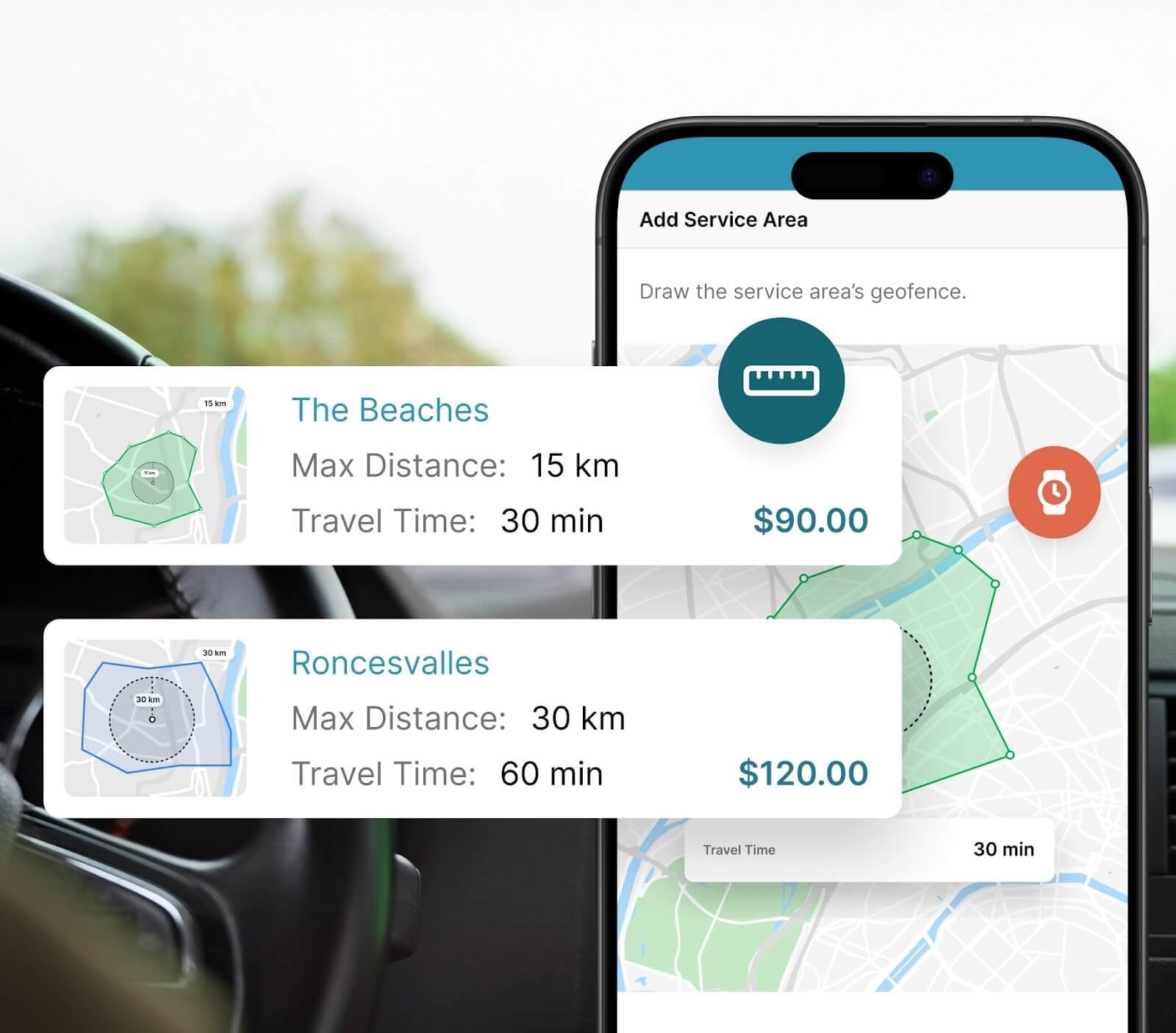
Here’s some additional insights of setting prices: How to Set Premium Prices by Area as a Mobile Practitioner?
Noterro GO helps keep your route tight. It limits how far apart back-to-back appointments can be booked, so you are not racing across town all day.
Also, the Apple CarPlay and Android Auto sync make navigation seamless between visits. Less driving means lower fuel costs, less stress, and more energy to see patients without burning out.
Travel time is automatically factored into your schedule. The minutes you need between visits are protected, so you are not starting every appointment already behind. Your day flows more realistically, and clients get a better experience because you arrive prepared, not rushed.
Mobile visits should not end with payment processing at a client’s house. With Noterro GO, you can set up schedules that include automatic payments through Square. Payments are handled in advance at the time of booking or immediately after the visit, saving time and keeping the visit focused on care rather than transactions.
Noterro GO includes a safety check-in and check-out feature. You check in upon arrival and check out upon departure.

If you don’t check out, your safety contact is alerted. For solo mobile practitioners, this adds a layer of peace of mind without extra effort.
Here’s something interesting: How to Scale Your Mobile Health Practice Without Growing Overhead
Managing clients while driving between appointments requires quick, low-effort access to information.
Instead of reading intake forms in your car, Noterro GO can play back a natural-language summary of the form. You hear what the client needs while driving to the appointment. You arrive informed, focused, and mentally prepared without looking at your screen.
One-tap messages like “I’m on my way” or “Running a few minutes behind” keep clients informed without interrupting your flow. Communication stays consistent without pulling you out of your rhythm.

Automated reminders go out without you having to think about them. Clients stay informed, no-shows drop, and communication stays professional even when you are fully booked on the road.
You might also like: How to Personalize Automated Reminders to Reduce No-Shows
Managing a mobile practice is different from running a traditional clinic, and eventually, the tools built for static schedules simply don’t suffice anymore. It’s time to consider Noterro GO if:
When the day starts feeling chaotic, and scheduling doesn’t align with the mobile work you’re doing, Noterro GO becomes the missing piece. It’s built to work for practitioners who are constantly on the move, keeping everything in sync without slowing you down.
Also read: How to Successfully Manage a Clinic and Mobile Practice on Wheels
Noterro GO is not a feature add-on. It is a comprehensive workflow designed for mobile health practitioners who work on the go, not behind a desk.
When scheduling, client management, charting, and communication all support movement, mobile care becomes simpler, safer, and more sustainable. Less friction and burnout, and more time spent doing the work you actually care about.

Tags
Nick Gabriele, Director, Noterro, has been leading the company to greater heights since May 2012. With his vision and 10+ years of expertise, Noterro has become a leading practice management software that offers users an innovative platform for storing notes, tracking appointments, and managing their practice.
Noterro was born out of the need to create a more efficient way to manage paper charts at Ontario College of Health and Technology, which Nick owned.
For nine years, he has performed Independent Medical Evaluations, which allowed him to sharpen his skills in assessing and providing solutions to various health-related issues. With a strong background in rehabilitation settings, including Chiropractic, Physiotherapy, and Massage Therapy, Nick has also garnered a wealth of experience in his field.
Furthermore, Nick has a knack for passion and proficiency in education that has also led him to work in private education for over 20 years. This invaluable experience has enabled him to develop a deeper understanding of how to deliver top-notch training and support to individuals and organizations alike.
In addition to his professional achievements, Nick is an active speaker and has participated in several webinars and podcasts on topics related to electronic record-keeping and practice management. He also has written a plethora of leadership articles on tech topics, including "Charting in the electronic age," "How to Leverage Practice Management Software." His work has been featured in top industry publications, such as Hamilton News. Nick’s insights also have been cited in notable Podcasts like Business Blueprint and Practiciology.


.webp)
No credit card required. Available 1-on-1 support.
.webp)
No credit card required. Available 1-on-1 support.
.webp)
.webp)



.webp)