

How to Save Hours with SOAP Templates & Macros in Chiro Practice

Most chiropractors know how to write proper SOAP notes. The problem is that charting still takes longer than it should, especially as patient volume increases or cases become more detailed.
In most clinics, the issue is not skill. It is rebuilding the same structure and language again and again.
The chiropractors who manage this well tend to do a few things differently:
- Start each visit with the correct note structure
- Use macros, including personal injury macros, to reduce repetitive typing
- Capture findings closer to the appointment
- Use workflow automation instead of relying on memory and speed
In this article, I’ll show you where documentation usually slows clinics down and how to fix it without reducing detail.
Where Time Is Lost in Chiropractic SOAP Notes
During documentation, chiropractors often spend time on repetition. Across follow-up visits, you end up rewriting similar subjective complaints, objective findings, assessments, and plan structures.
Even when the patient is progressing well, the documentation pattern feels familiar. So you rebuild it from scratch again.
Personal injury cases and complex treatment plans further increase the workload. These cases require extra detail, clearer timelines, and consistent phrasing across visits, and that consistency is often required. The problem is not the detail itself, but having to manually recreate that detail every single time.
When documentation lacks structure, charting spills into after-hours work. That is when burnout starts to creep in: the clinical work ends, but the administrative workload does not.
How Templates and Macros Actually Save Time
Templates and macros solve different parts of the same problem, and understanding that difference is where real time savings begin.
What SOAP Templates Actually Fix and What They Don’t
SOAP note templates fix structure, and structure is where most wasted time hides in chiropractic documentation. When each visit type starts with the correct framework, you no longer have to rebuild the layout for an initial exam, follow-up, or discharge note each time.
Instead of setting up the format, you focus on documenting what actually changed during the visit. That is where real time savings begin to show up.
Templates actually fix:
- Rebuilding note layout for each visit type
- Missed sections during busy clinic days
- Inconsistent formatting across cases or providers
Templates do not fix:
- Your assessment
- Your clinical reasoning
- Your treatment decisions
Care evolves, especially in more detailed cases like personal injury documentation. Templates need to remain editable and flexible, supporting complexity without becoming rigid.
This is where a system like Noterro, a clinic management software, fits naturally into the conversation. It is used by chiropractors and other practitioners, and inside it, note templates define the structure of a specific visit type without pre-filling the content.
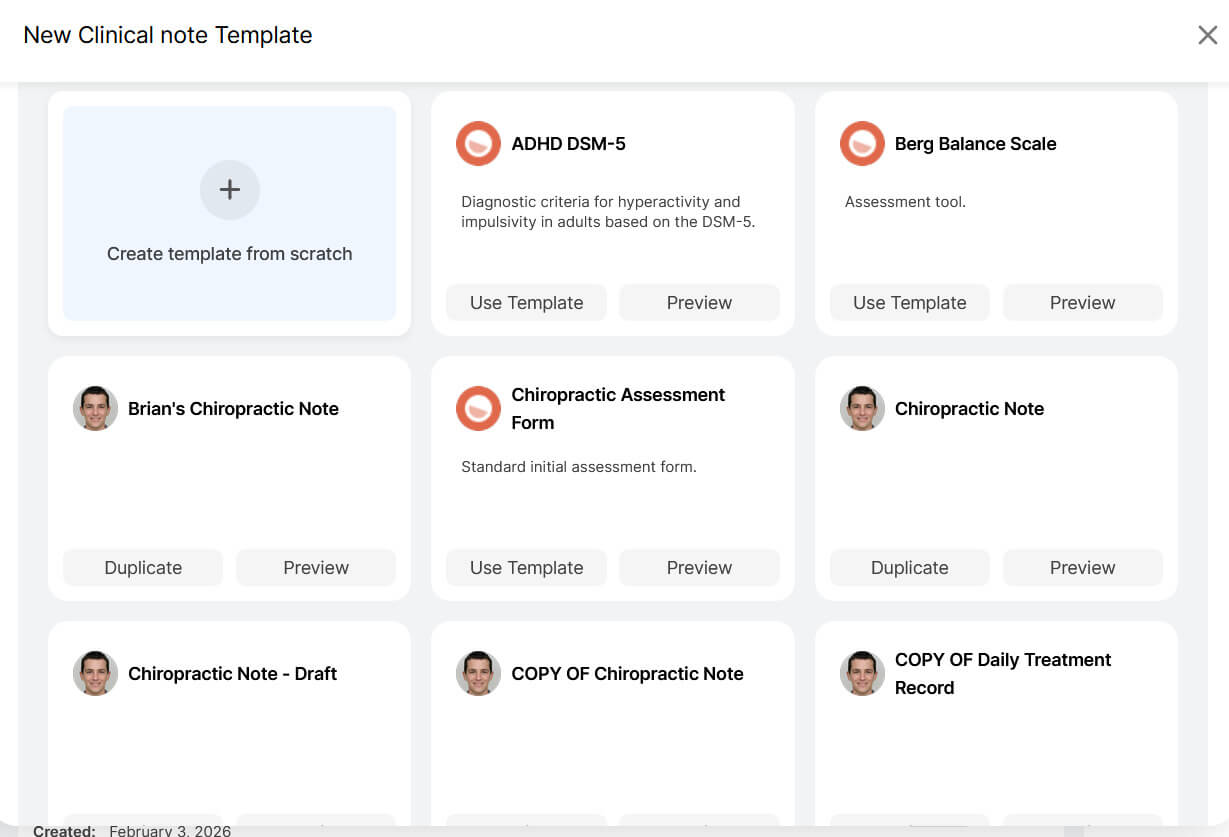
You select the framework, and you still write the clinical details. Templates remove layout friction while leaving clinical judgment entirely in your hands.
Using Macros to Eliminate Repetitive Charting
Over the years, I’ve noticed how much of chiropractic documentation repeats across visits. The same pain descriptions, range-of-motion findings, and treatment responses recur repeatedly, and retyping them is where time quietly disappears.
Macros let you insert structured clinical language and adjust it for the current visit, which is far more efficient than rebuilding the same phrasing from memory.
In personal injury cases, where consistent wording across visits is often required, personal injury macros help maintain structure without resorting to risky copy-paste.
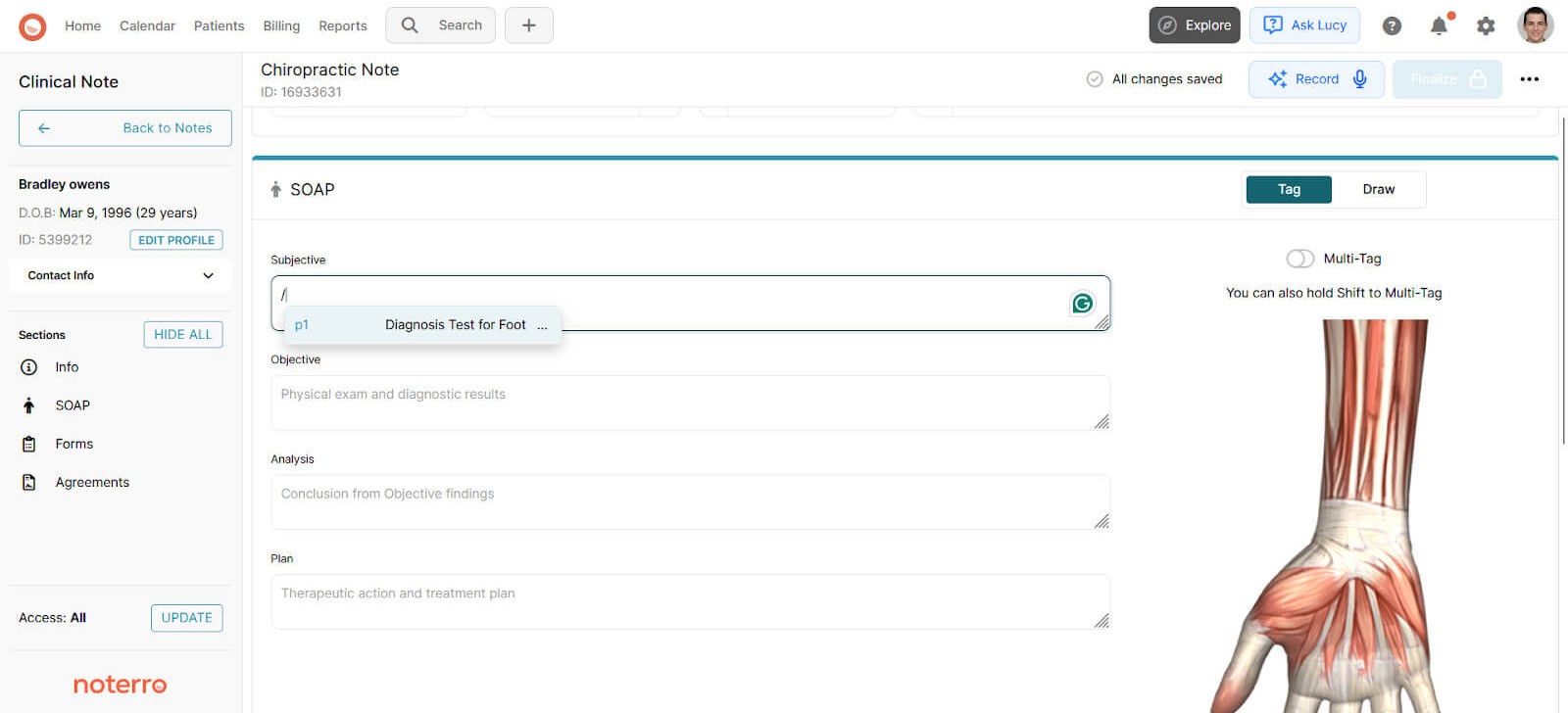
In Noterro, this appears as Snippets that store commonly used clinical language for quick insertion. You type less, but you still review and refine every note, which keeps the documentation accurate. Macros don’t replace thinking, but only remove unnecessary repetition.
You might find this helpful: Step-by-Step Guide to Choosing the Best Automation Software for Chiropractors
Bonus: Voice-to-text AI Scribe for real-time note-taking
Repetition is one issue. Timing is another.
What often slows charting down is not typing speed, but the delay between the visit and the documentation. When you sit down later, you use extra energy to reconstruct details that were clear during treatment.
I’ve found that speaking findings during or immediately after the appointment changes that dynamic. Voice-to-text captures visit-specific details while they are still fresh, reducing after-hours charting.
This works best alongside templates and macros rather than instead of them. In Noterro, Scribe is integrated into the same system, enabling chiropractors to efficiently convert spoken notes into structured SOAP documentation.
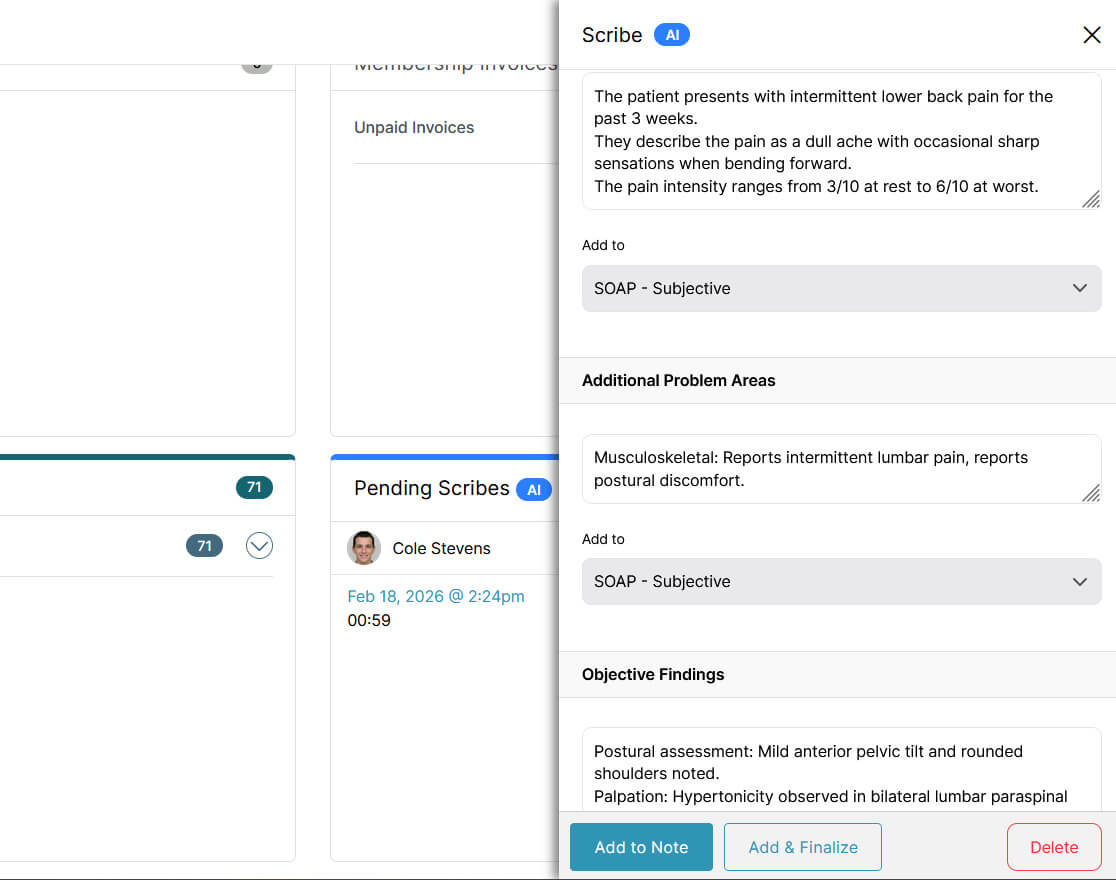
You still review and finalize the note yourself, but you avoid starting from a blank screen long after the visit has ended.
Also read: Chiropractic SOAP Notes Software: Simplify Documentation & Enhance Patient Care
Documentation Workflows by Clinic Type
Different clinic setups experience documentation pressure differently. The solution must align with the workflow, not force everyone into the same pattern.
| Clinic Type | Documentation Challenge | What Matters Most | How Templates, Macros, and AI Scribe Help |
|---|---|---|---|
| Solo chiropractor | Charting between appointments often gets rushed or pushed to the end of the day. | Fast note completion without losing clinical clarity. | Appointment-type SOAP note templates reduce setup time. Macros remove repetitive typing. AI Scribe captures findings quickly when schedules are tight. |
| Mobile chiropractor | Notes are completed on the go, often between locations or in short gaps. | Simple workflows that work on any device and minimize typing. | Templates keep notes structured. Macros handle repeated findings and plans. AI Scribe speeds up note-taking when typing on mobile feels inefficient. |
| Hybrid practice owner | Documentation must stay consistent across clinic and mobile visits. | One system that works the same everywhere. | Shared templates ensure the same structure is used regardless of location. It protects consistency as your weekly workflow shifts. |
| Multi-practitioner clinic | Different practitioners document differently, creating inconsistency across patient records. | Standardized notes without restricting clinical judgment. | Shared templates guide structure. Macros standardize common language, ensuring documentation quality remains consistent across providers. |
| Clinic admin | Incomplete or unclear notes lead to follow-ups, delays, and extra administrative work. | Clear, complete notes that require less review. | Structured templates reduce missing sections and vague entries, improving workflow efficiency across the clinic. |
SOAP notes also play a critical role in compliance. Read more in detail here: The Chiropractor’s Guide to Compliance and Malpractice Coverage
What to Look for in SOAP Template Software for Chiropractors
When chiropractors ask me what to look for in chiropractic clinic management software with SOAP notes, I tell them to forget the feature list for a minute. What matters is whether the system fits how you actually document during a busy week.
Here’s what I suggest paying attention to:
- Flexible visit-type structure: You should be able to define how an initial visit looks versus a follow-up or discharge note, and still edit freely inside each section.
- Speed inside the note: If it takes too long to open, modify, or complete a SOAP note, clinicians delay charting. Once that habit forms, time savings disappear.
- Simple adoption for the whole clinic: The workflow should feel natural during patient care and clear enough that a clinic admin can review documentation without extra back-and-forth.
- Room to grow: What works for a solo chiropractor should still work when you add another provider. Your documentation framework should scale without forcing a rebuild.
The right software should reduce friction in your day. If you feel like you are fighting it, it is not helping you save time.
An interesting read: 8 Must-Have Tools for Running a Modern Chiro Practice
Conclusion
Saving time on SOAP notes comes down to better systems, not cutting details. When structure, repetition, and timing are handled well, documentation stops growing as your schedule does.
Templates give each visit the correct note layout from the start. Macros, including personal injury macros, reduce the need to retype common clinical language. Voice-to-text records findings during or immediately after the appointment, so documentation is completed the same day rather than carried into the evening.
If you look closely at where you are rebuilding notes or retyping familiar language, you will see where time savings are hiding. With a workflow built for chiropractic documentation, including systems like Noterro, those hours can start coming back.
FAQ
Can structured documentation improve insurance audits or reduce claim disputes?

How do I measure whether my documentation workflow is actually saving time?
Are voice-to-text tools accurate enough for detailed musculoskeletal findings?
What documentation mistakes most often create billing delays or rejected claims?
How do I train associate chiropractors to document consistently without micromanaging them?
Share




.webp)
.webp)
.webp)